A release management process that survives a deadline
A release management process gets a change to users safely and gets it back out fast if it fails. The version I run: scope, gates, staged rollout, rollback.
Asghar Ali · Chief Technology Officer, Kakushin.io LTD
A release management process is the set of steps, owners and checks that takes a change from "done in code" to "safely in front of users", and gets you back out quickly if it is not safe. A good one is short, has one named owner per release, relies on automated gates rather than meetings, and keeps the way back as ready as the way forward. It matters most under deadline pressure, because that is when teams start skipping steps.
I am a CTO rather than a release manager by title, but release governance is part of the job: across a portfolio of 39 products and client projects, built by a team of around twenty over two time zones, and on native iOS and Android apps that ship on both platforms every fortnight. This is the process I hold to when the date cannot move.
What is release management?
Release management is the discipline of planning, building, testing, deploying and verifying software changes so that production stays stable while it keeps changing. It sits between development, QA and operations, and it answers three questions for every release: what is going out, who decided it was safe, and how do we undo it.
ITIL 4 treats it as a practice of its own, about making new and changed services and features available for use, and puts the technical work of moving code into live environments in a separate deployment management practice. You do not need the ITIL vocabulary to run release management well, but that split is the most useful idea in it.
The test of any process is simple: can you ship on a bad day, with a tired team, and still know what went out, who approved it and how to reverse it?
What is the difference between release and deployment?
Deployment puts code on servers. Release makes a change available to users. They do not have to happen at the same time: you can deploy code that is switched off and release it later by turning on a feature flag for some or all users.
| Deployment | Release | |
|---|---|---|
| Question it answers | Is the new code running in production? | Can users see and use the change? |
| Controlled by | The CI/CD pipeline | Product and engineering together, through flags or rollout rules |
| How you reverse it | Redeploy the previous build | Turn the flag off |
| Typical risk | Build, configuration, database migration | Behaviour, load, user experience |
Separating the two lets you deploy small changes continuously, move the risky decision (who sees it, and when) into a switch you can reverse in seconds, and stop releasing at six on a Friday evening just because the deploy happened to be ready. Pete Hodgson's feature toggles article is the clearest guide to the kinds of flag and how long each should live. Release flags should be short-lived; an old flag nobody dares remove is technical debt with a switch on it.
What are the steps in a release management process?
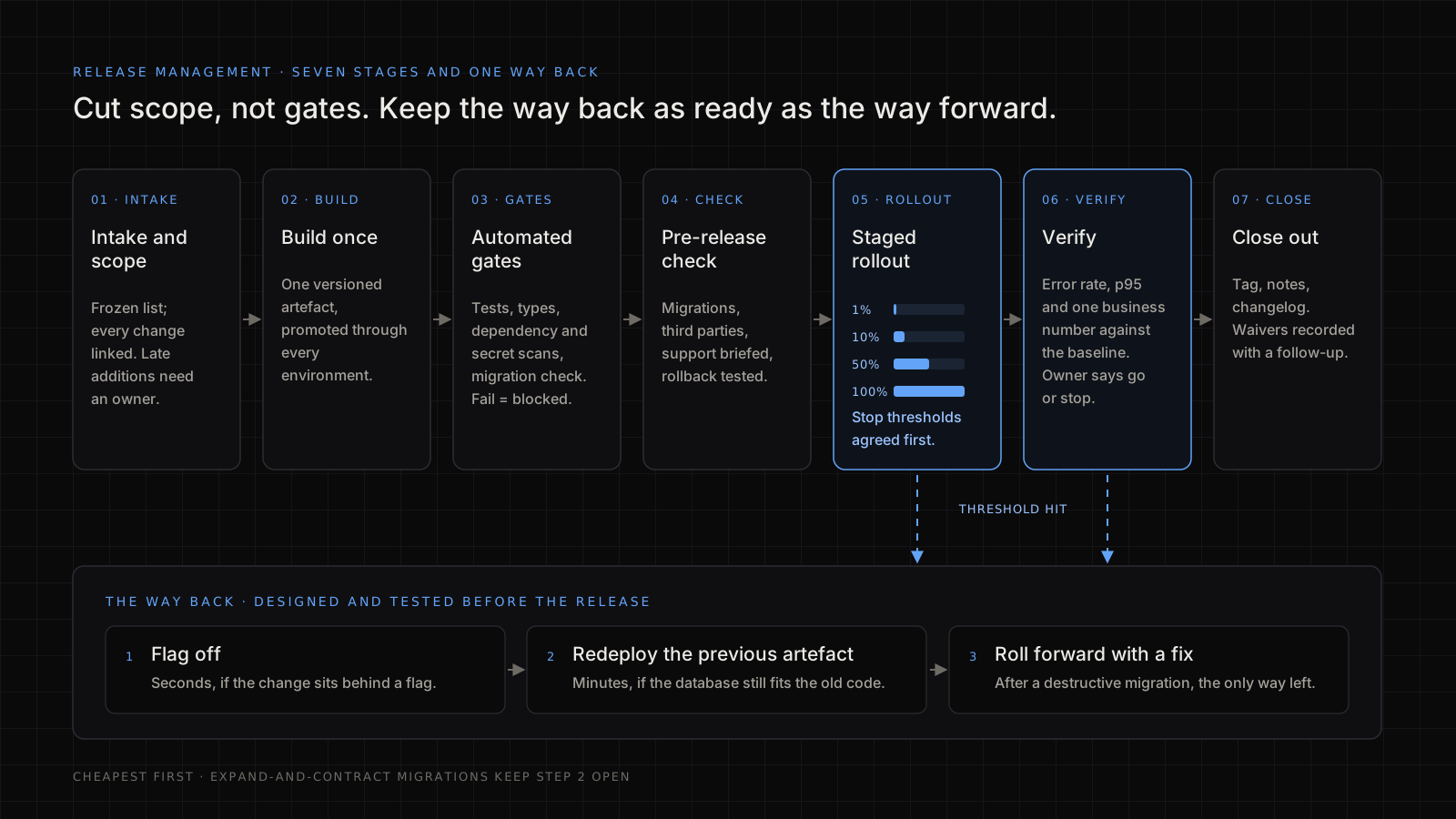
A workable process has seven steps. Skip none of them; make each as light as the risk of the release allows.
- Intake and scope. List what is in the release, with a link to each change. Anything not on the list is not in. A late addition needs a named owner and a reason.
- Build once. Produce one versioned artefact and promote that same artefact through every environment. Rebuilding per environment means production runs something nobody tested. The Google SRE book's chapter on release engineering makes the case for hermetic, repeatable builds.
- Automated gates. Tests, type checks, dependency and secret scans and a migration check run on every candidate. A failing gate blocks the release; it is not advice.
- Pre-release check. A short human checklist for what automation cannot see: data migrations, third-party changes, support briefed, rollback tested.
- Staged rollout. Release to a small share of users, or one region, first. Watch, then widen.
- Verify. Compare error rate, latency and one or two business numbers with the baseline for a fixed window. One person owns the call to continue or stop.
- Close out. Tag the release, record what shipped, note any surprises and update the changelog.
Most tool-vendor guides describe the same phases with different names. Where teams actually fail is not the list of phases. It is gates that can be skipped, rollouts with no agreed stop condition and rollbacks that have never been tried.
Which CI/CD gates should block a release?
Block on things that are cheap to check and expensive to get wrong. These are the gates I insist on in the pipeline:
- The test suite and type checks pass on the exact artefact being released, not on a rebuild.
- Database migrations are reversible, or come with a written forward-fix plan, and have been run against a copy of production-sized data.
- No known critical vulnerabilities in dependencies, and no secrets in the diff. My application security best practices cover the rest of what belongs in the pipeline.
- Configuration and environment changes are reviewed alongside the code, because a broken config ships as surely as a broken function.
- Observability exists for the new behaviour, so you can tell it is failing before a customer tells you.
- A named person is on call for the release window.
Gates only work if they cannot be bypassed quietly. On the automated pull-request pipeline we run internally (review, fix, merge, deploy, announce, release), a code-level preflight refuses draft pull requests, protected branches and diffs that look like they contain a secret before any automation is allowed to act. That kind of check lives in code, so nobody has to remember it at the end of a long day.
What belongs in a software release checklist?
A release checklist covers what the pipeline cannot check for you. Keep it to one screen, and attach the completed copy to the release record.
Before the release
- Scope list frozen, every change linked to its ticket or pull request
- One artefact built, with its version recorded
- All automated gates green on that artefact
- Migrations reviewed: reversible, or a forward-fix plan written
- Feature flags for risky changes created, defaulting to off
- Rollback tested on staging within the last week
- Stop thresholds agreed (error rate, p95 latency, one business number)
- Support and anyone customer-facing briefed on what changes
- Release owner and on-call engineer named
During the release
- Rollout started at the smallest stage
- Dashboards open against the baseline at each stage
- Continue or stop decided by the owner at each stage, and written down
After the release
- Release tagged and notes published
- Any waived gate recorded with a follow-up and a date
- Old flags scheduled for removal
For mobile apps, add the store-specific items, such as signing, review notes and the release-build security checks in my mobile app security best practices.
How do I roll out and roll back safely?
Roll out in stages, with stop conditions agreed before you start, and keep a tested way back. Rollback is a feature of the release, not something you improvise during an incident.
A staged rollout for a web service, with illustrative numbers: 1 per cent of traffic for 30 minutes, 10 per cent for an hour, 50 per cent for an hour, then everyone. At each stage, check error rate, p95 latency and one business number, such as completed checkouts. If any of them moves past a threshold you agreed in advance, stop and roll back. Agreeing the thresholds beforehand matters: in the middle of an incident nobody argues well about whether a number is "bad enough".
Rollback options, from cheapest to most expensive:
- Flag off. Seconds, if the change sits behind a flag.
- Redeploy the previous artefact. Minutes, and only safe if the database is still compatible with the old code.
- Roll forward with a fix. Sometimes the only choice after a destructive migration.
The trap is the database. Use the expand-and-contract pattern, which Martin Fowler's site calls parallel change: add the new column or table first, deploy code that works with both shapes, migrate the data, and only remove the old structure in a later release. That keeps the previous version of the code working, so option 2 stays open.
Mobile releases cannot be rolled back
A store release cannot be pulled back from phones that already have it, so the staged rollout is your main protection. Apple's phased release spreads an update over seven days (1, 2, 5, 10, 20, 50 and then 100 per cent of users with automatic updates) and can be paused, though anyone can still download the update by hand. Google Play's staged rollouts let you choose the percentage and halt it. On a fortnightly two-platform cadence, the practical rule is that every risky change ships behind a server-side flag, so "rollback" means switching the feature off on the server while a fixed build goes through review.
How do I keep the process alive under a deadline?
Cut scope, not gates. When a date is fixed, the temptation is to skip the pre-release check or test less. That swaps a visible delay for an invisible risk. Do this instead:
- Freeze scope early. Agree a cut-off after which only fixes go in. Everything else waits for the next release.
- Ship dark. Merge unfinished features behind flags so incomplete work does not hold the release up.
- Make the safe path the fast path. If the pipeline takes two hours, people will go round it. Make it faster before the crunch, not during it.
- Agree in advance who can say no. One accountable person may delay a release for a failed gate, and the business knows that before the deadline arrives.
- Write down every exception. If you waive a gate, record who, why and what the follow-up is. Waivers without a record become the new process.
One version of this I ran was a production freeze on the main branch while a client held back go-live, alongside daily releases of client-feedback fixes that each had to pass a merge gate. What made it workable was a regression suite of 233 Playwright tests written against 148 documented use cases, so the question "is this fix safe to merge?" was answered by the suite rather than by opinion.
How do I know the release process is working?
Measure it with the DORA software delivery metrics rather than by how many releases went smoothly last month. DORA now uses five metrics: change lead time, deployment frequency and failed deployment recovery time for throughput, and change fail rate and deployment rework rate for instability.
The finding that matters for anyone under deadline pressure is DORA's: speed and stability are not trade-offs, and for most teams the metrics are correlated. Small, frequent releases are easier to test and to reverse than large, rare ones. If your process makes releases slower and bigger in the name of safety, the numbers will usually show it getting less safe.
When I look at a team's delivery from the outside, in technical due diligence or a source code audit, these are among the first things I ask for: how often they ship, how often a release needs fixing, and how long recovery takes.
What does a release manager do?
A release manager coordinates releases. They own the release calendar, the scope list, the go or no-go decision, communication with stakeholders and the record of what shipped. In a small team a lead engineer does this alongside coding; in larger organisations it is a dedicated role.
The role is not a gatekeeper adding approvals. Good release managers remove friction: they automate the checks, make the status visible and keep the process short enough that nobody is tempted to go round it. Their job is to make releases predictable, so nobody is surprised. If nobody owns this at all, setting it up is part of what a virtual CTO should do in the first 90 days, and it is part of the fractional CTO work I take on.
What is the difference between a project manager and a release manager?
A project manager owns the plan, budget and delivery of a body of work over time. A release manager owns the mechanics and timing of getting a specific build into production safely. The project manager asks "are we on track for the scope?"; the release manager asks "is this build safe to ship now, and can we undo it?".
They work together, and in small teams one person often does both, but the questions are different and should not be blurred.
What is the salary of a release manager?
It varies too much by country, seniority and whether the role includes DevOps work for any single figure to be useful. Check a current salary survey for your market, and compare against DevOps and engineering manager roles rather than the title alone, because many teams give release duties to one of those roles.
FAQ
What is the difference between release and deployment?
Deployment puts new code on servers; release makes the change available to users. With feature flags the two can be separated: deploy the code switched off, then release it by turning the feature on for a share of users, and turn it off again in seconds if something goes wrong.
What are the steps in a release management process?
Seven: intake and scope, build one artefact, automated gates, a short pre-release check, staged rollout, verification against a baseline, and close-out with a tag and a record. Make each step as light as the risk allows, but skip none, and keep a tested rollback path alongside them.
What does a release manager do?
They own the release calendar and scope, run the go or no-go decision, coordinate teams and communication, and record what shipped. The best ones also improve the pipeline, automating checks and shortening it, so that releases become routine rather than events.
What is the difference between a project manager and a release manager?
A project manager owns scope, schedule and budget across a project. A release manager owns getting a specific build to production safely, including gates, rollout and rollback. In small teams one person may do both jobs, but the questions each asks are different.
How often should we release?
As often as your gates let you do it safely. Small, frequent releases are easier to test and to reverse than large ones, and DORA's research finds speed and stability move together for most teams rather than trading off against each other.
Sources
All read 16 November 2026.
- DORA: software delivery performance metrics
- Google SRE book: release engineering
- Pete Hodgson on martinfowler.com: Feature Toggles (aka Feature Flags)
- Danilo Sato on martinfowler.com: Parallel Change
- PeopleCert: ITIL 4 Practitioner: Release Management
- Apple: release a version update in phases
- Google Play Console Help: release app updates with staged rollouts