Mobile app security best practices: keys, pinning, storage
Mobile app security best practices from a CTO: where to keep secrets, how to store tokens, when to pin certificates, what to check before every release.
Asghar Ali · Chief Technology Officer, Kakushin.io LTD
The best mobile app security practice is to assume the device, the app binary and the network are all hostile, and to keep anything that matters on the server. Then harden what has to live on the phone: store tokens in the platform keystore, never ship secrets in the app, use TLS everywhere, and test the signed release build, not just the debug one.
I do security reviews on mobile and web code, and the same handful of mistakes keep turning up. On a pair of native iOS and Android customer apps running over eight backend services, I introduced a relay proxy that took every API key out of the shipped apps, then drove the penetration-test remediation through to production acceptance. This is the list I would give a team before a release.
What is the best way to secure a mobile app?
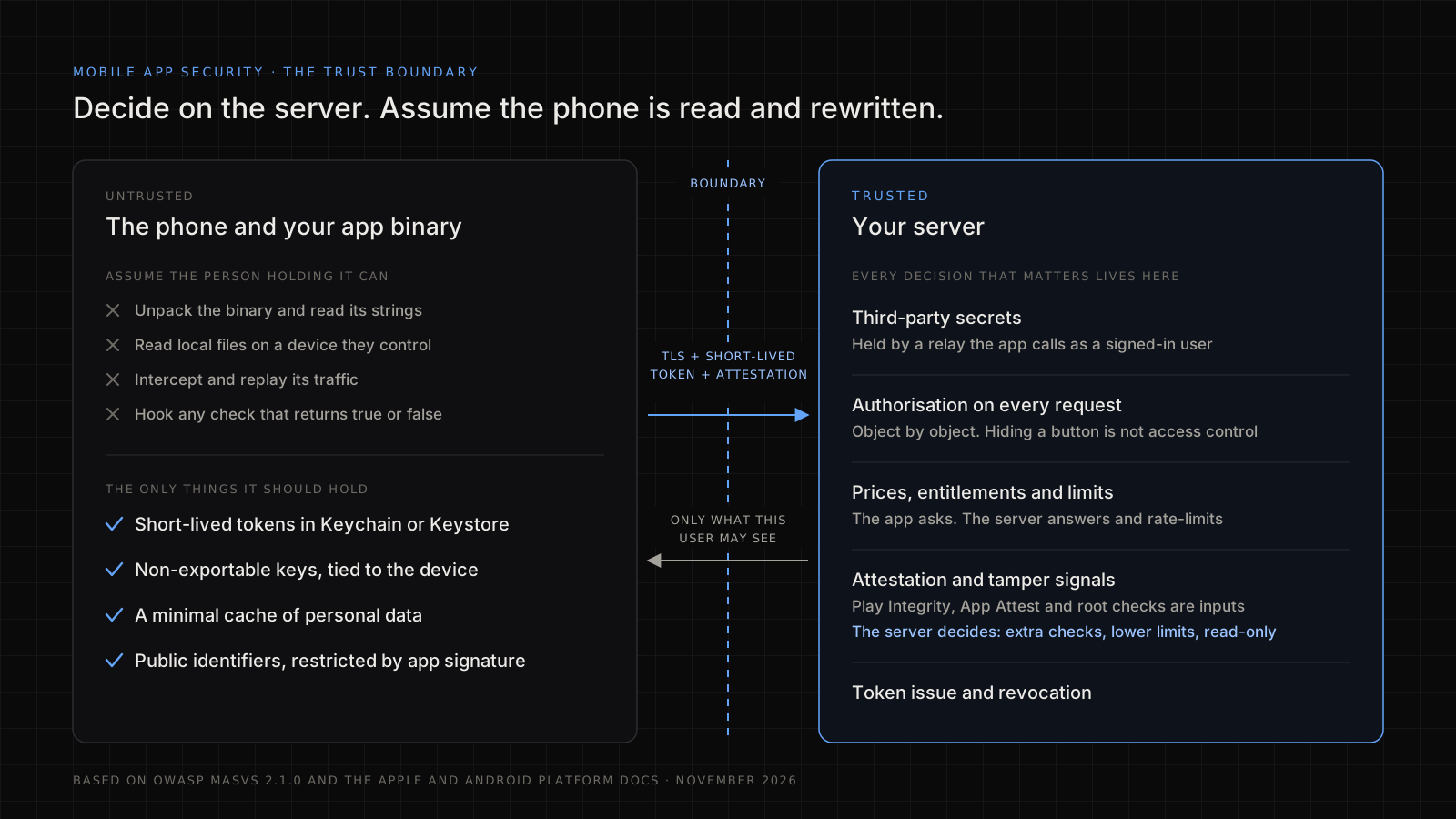
Treat the app as public code running on a machine you do not control. Anything inside the binary can be extracted, and ordinary files on a phone can be read by whoever controls it. So security comes from three moves:
- Keep authority on the server. Authorisation, pricing, entitlement and validation are server decisions. The app only asks.
- Minimise what the device holds. Short-lived tokens, no passwords, no bulk personal data cached "for speed".
- Verify what you ship. Test the signed release build against a recognised checklist.
Which standard should I follow?
Follow OWASP's Mobile Application Security Verification Standard (MASVS) for what to verify, and the platform vendors' documentation for how to build it. As of November 2026 the current releases are MASVS 2.1.0 and the testing guide, MASTG 2.0.0. The OWASP Mobile Top 10, last revised in 2024, is the shorter list of risks that most teams recognise.
MASVS has eight control groups. This is how I line them up against the Top 10. The mapping is my own working view, not OWASP's.
| Area | MASVS group | Closest Mobile Top 10 (2024) risk |
|---|---|---|
| Data on the device | MASVS-STORAGE | M9 Insecure Data Storage |
| Cryptography | MASVS-CRYPTO | M10 Insufficient Cryptography |
| Sign-in and sessions | MASVS-AUTH | M1 Improper Credential Usage, M3 Insecure Authentication/Authorization |
| Traffic to the backend | MASVS-NETWORK | M5 Insecure Communication |
| OS features and other apps | MASVS-PLATFORM | M8 Security Misconfiguration |
| Code, inputs and dependencies | MASVS-CODE | M2 Inadequate Supply Chain Security, M4 Insufficient Input/Output Validation |
| Reverse engineering and tampering | MASVS-RESILIENCE | M7 Insufficient Binary Protections |
| Personal data | MASVS-PRIVACY | M6 Inadequate Privacy Controls |
One thing older guides get wrong: MASVS no longer defines the L1, L2 and R levels itself. They were reworked as MAS Profiles, which are MAS-L1 Essential Security, MAS-L2 Advanced Security, MAS-R Resilient Security and MAS-P Baseline Privacy. OWASP treats applying them as a risk decision made with the business, and so do I. A fitness app with no account is not a banking app, and the checklist should not treat them the same.
Where should secrets and keys live?
Secrets should not live in the app at all. Any API key, password or signing secret embedded in an app can be recovered, however it is obfuscated, because the app has to be able to use it at runtime.
What to do instead:
- Put third-party secrets behind your own backend. The app calls your relay as a signed-in user, and the relay calls the vendor with the secret and applies per-user limits. This is the change I make most often when I take over a mobile codebase.
- Use per-user, short-lived credentials. If the app has to call a service directly, issue a scoped, expiring token from your server after the user signs in.
- Restrict keys that must ship. Public keys such as a maps key can be limited by app signature and bundle identifier in the provider's console. Treat them as identifiers, not secrets.
- Rotate on suspicion. Keep a rotation process ready. The first time you need it should not be during an incident.
Here is a quick check you can run today. It takes minutes, on the signed artefact you upload to the store. An IPA is a zip too.
unzip -q app-release.apk -d out
grep -raoE '(AKIA[0-9A-Z]{16}|sk_live_[0-9a-zA-Z]+|-----BEGIN [A-Z ]*PRIVATE KEY|Bearer [A-Za-z0-9._-]{20,})' out
Add the key prefixes of the vendors you actually use. A hit means rotate that key today and move it behind the relay. An empty result proves very little, since it only catches strings stored in plain form. Which keys are meant to be on a device, and how to move an app already in the stores without breaking old versions, is covered in why API keys leak from mobile apps and the relay fix. Secrets are also part of what I check in a code audit.
How should I store tokens and user data on the device?
Store tokens in the iOS Keychain, and protect sensitive data on Android with keys held in the Android Keystore, never in plain preferences, files or logs. Keystore key material stays non-exportable and can be bound to secure hardware where the device has it. The Keychain is Apple's encrypted store for small secrets.
| Data | Where | Avoid |
|---|---|---|
| Access and refresh tokens | Keychain, or encrypted with a Keystore key | SharedPreferences, UserDefaults, plain files |
| Encryption keys | Keystore or Secure Enclave, non-exportable | Hard-coded keys, keys derived from a device ID |
| Cached personal data | Encrypted database such as SQLCipher, minimal fields | Full API responses written to disk |
| Logs | Nothing sensitive | Tokens, emails, request bodies |
| Clipboard and screenshots | Disable for sensitive screens | Letting one-time codes sit in the clipboard |
If your Android code uses EncryptedSharedPreferences, note that Google deprecated all the Jetpack Security Crypto APIs during 2025, in favour of the platform APIs and using Android Keystore directly. Many tutorials still recommend it. Existing data is not suddenly exposed, but do not start new work on it.
Exclude sensitive files from iCloud and Android cloud backups where that is appropriate, and clear data at sign-out. Short token lifetimes limit the damage if a device is lost.
How do I secure communication with the backend?
Use TLS for every connection and leave the platform defaults switched on. App Transport Security operates by default for apps linked against the iOS 9 SDK or later, though it does not cover lower-level networking APIs. On Android, cleartext traffic has been disabled by default since Android 9 (API level 28). Do not turn these off to make a staging server work, and never ship code that trusts all certificates.
Certificate pinning goes further: the app only accepts certificates or public keys you have specified. It defends against a rogue or compromised certificate authority and some interception. It also breaks when you rotate certificates carelessly, and a stale pin can lock every user out until they update.
My rule:
- Pin where the data justifies it (finance, health, high-risk accounts).
- Pin public keys and always carry a backup pin. Android's
<pin-set>in the network security config and iOS'sNSPinnedDomainslet you declare this without hand-written trust code. - Decide how a stale app recovers before you ship. A
<pin-set>can carry an expiry date after which pinning stops, and Google's documentation is honest that this may also let attackers bypass the pin. - Do not treat pinning as proof against someone who controls the device. They can bypass it.
The server side still matters: validate every input, rate-limit, and authorise each request. My application security best practices article covers that half.
What goes wrong in authentication and sessions?
The common failures are weak session handling and trusting the client. To avoid them:
- Use the standard flow. RFC 8252 says native apps must use an external user-agent for OAuth, normally the system browser, must not use an embedded web view, and must implement PKCE.
- Prefer passkeys or an authenticator app to SMS codes for a second factor.
- Keep access tokens short-lived and refresh tokens revocable, bound to the device where you can.
- Make biometrics unlock a key rather than return a yes or no. A check that only returns true in app code can be hooked. Use Android's
BiometricPromptwith a Keystore key that requires authentication, or a Keychain item with biometric access control on iOS. - Re-check authorisation on the server for every call. Hiding a button is not access control, and IDOR is what happens when you forget.
What should I do about code protection and tampering?
Add resilience in proportion to risk, and never rely on it alone. Code obfuscation (R8 on Android, symbol stripping for Swift), root and jailbreak detection, debugger detection and integrity checks all slow down reverse engineering. They do not stop it.
Plenty of guides tell you to shut the app down the moment root is detected. I would not, because that check runs in code the attacker controls, and it also locks out honest users. Send the signal to the server instead. The Play Integrity API on Android and App Attest on iOS let your backend check that a request comes from a genuine copy of your app. Apple says plainly that App Attest cannot definitively identify a device with a compromised operating system, and that it belongs in an overall risk assessment.
So the server decides what a suspicious device gets: extra verification, lower limits or read-only access.
What belongs in a release checklist?
Run this on the signed release build, every release. It is short on purpose, and it covers security only: the wider release management process, from frozen scope to staged rollout and rollback, sits around it.
- Dependencies and third-party SDKs inventoried and scanned for known vulnerabilities; lockfiles reviewed.
- No secrets in the binary or the repository history, using the search above and a secret scanner.
- Built artefact run through a static scanner. MobSF is a good free default for CI.
- Debug flags, test endpoints and verbose logging off.
- Backups, screenshots and clipboard handled for sensitive screens.
- Deep links and intents validated; exported Android components limited to what is needed.
- WebViews restricted: JavaScript bridges off unless required, only trusted origins loaded.
- TLS config checked, with pins and a recovery plan if used.
- Permissions limited to what the features need, with honest store privacy disclosures.
- Crash and analytics SDKs configured not to collect personal data.
- Signing keys held in a protected build system, with the upload key separate from the app signing key where the store supports it.
If the app was largely generated with AI tools, read the security risks nobody checks in vibe-coded apps first, because those failures appear before anyone reaches this list.
If you want an independent look at a mobile app before launch, security reviews and vulnerability testing are part of the work I take on.
Who gets hacked more, Android or iPhone?
Neither platform makes your app safe, and I would not choose one on this basis. Android allows installs from outside the official store and runs on a far wider range of devices and patch levels. iOS has a tighter install path and more uniform updates. The comparison figures most often quoted are years old or come from vendors arguing a case, so I do not build decisions on them.
For app builders the practical answer is that the weak point is usually your own app and backend: leaked keys, insecure storage and missing server checks. Fix those on both.
FAQ
What are the best practices for mobile app security?
Keep secrets off the device, store tokens in Keychain or Keystore, use TLS with proper validation and authorise every request on the server. Minimise the data you cache, keep dependencies and SDKs patched, and test the signed release build against OWASP MASVS before it ships.
What are some best practices for app security in general?
Validate all input, apply least privilege, use strong standard authentication, encrypt sensitive data in transit and at rest, log without leaking secrets, scan dependencies and review before each release. Mobile adds device storage, a binary in the attacker's hands and platform permissions on top of that list.
What is OWASP MASVS?
MASVS is OWASP's standard for what a secure mobile app has to do. Version 2.1.0 has eight control groups: storage, cryptography, authentication, network, platform, code, resilience and privacy. Its companion, the MASTG, explains how to test them, and MAS Profiles set how much applies to your app.
Should I use certificate pinning?
Use it for high-risk apps such as finance or health, and plan for rotation first: pin public keys, always carry a backup pin and know how a stale app will recover. Do not rely on it alone, because someone who controls the device can bypass it.
Is obfuscation enough to protect an API key?
No. Obfuscation only slows extraction, and the app still has to use the key at runtime, so it can be recovered. Keep real secrets on your server behind a relay, and give the app short-lived, scoped credentials that your backend issues after sign-in.
Should I still use EncryptedSharedPreferences?
Not for new work. Google deprecated all the Jetpack Security Crypto APIs in 2025 in favour of the platform APIs and direct use of Android Keystore. Existing data is not suddenly exposed, but plan a migration: generate a non-exportable Keystore key and encrypt what you store with it.
Sources
All read 9 November 2026.
- OWASP MASVS, MASTG and MAS Profiles
- OWASP Mobile Top 10
- Android: security tips, network security configuration and Android Keystore
- Jetpack Security release notes
- Play Integrity API overview
- Apple Platform Security guide
- Apple: Preventing insecure network connections and DeviceCheck and App Attest
- RFC 8252: OAuth 2.0 for Native Apps and RFC 7636: PKCE