Application security best practices: the list I enforce
The application security best practices that prevent real incidents, in the order they pay off: authorisation, secrets, input, dependencies and the CI pipeline.
Asghar Ali · Chief Technology Officer, Kakushin.io LTD
Most lists of application security best practices are written to be complete. They run to sixty items, every item gets the same weight, and a team with a release on Friday reads the first ten and closes the tab. The list is right; it just does not tell you where to start.
This one is written the other way round. It is the short list of web application security best practices I enforce on the systems I am responsible for, web and mobile alike, and the one I check first in a code review of someone else's. Each item is here because its absence is behind a real class of incident, not because a standard mentions it. It is ordered by where the practice lives in the life of a system, and inside that by how much damage its absence does.
If you only have a week, do the first four sections. They cover most of the security vulnerabilities that turn into real security incidents.
Read this first: where breaches actually come from
Almost every serious problem I find in a review falls into one of five buckets:
- Authorisation that is missing or checked in the wrong place. A user can read or change something that belongs to someone else.
- Secrets where they should not be. A key in the repository, in the client bundle, or in a mobile binary.
- Untrusted input that reaches an interpreter. A query, a shell, a template, a file path.
- Dependencies nobody is watching. A known vulnerability in a library that was added two years ago and never updated.
- No way to notice. The breach happened months ago; nothing was logged that would have shown it.
Clever cryptographic attacks and zero-days are real, but they are rarely how a product company gets hurt. The five above are. The OWASP Top 10 says much the same thing in its own words, and it is worth reading once with your own system in mind.
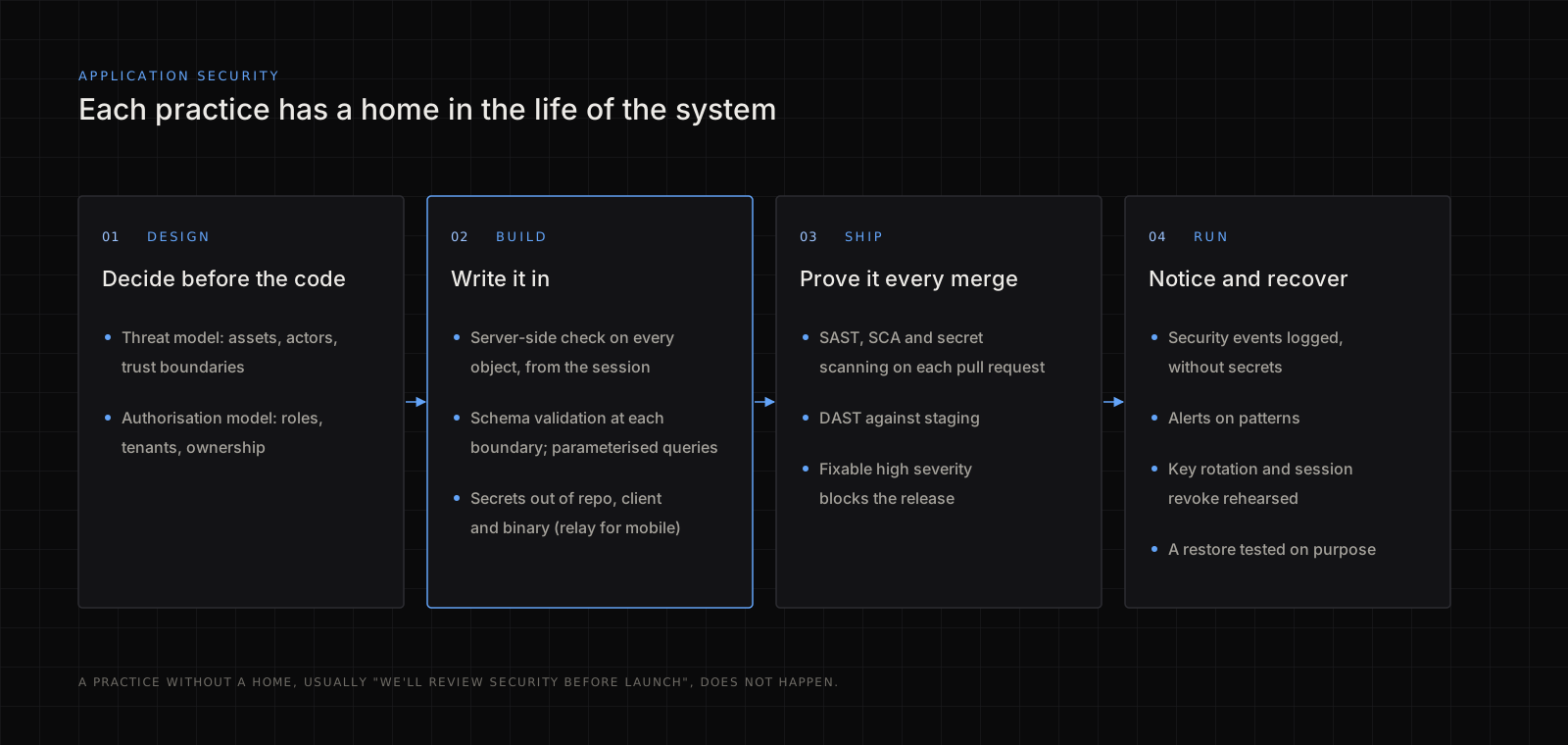
Design: an hour of threat modelling
Before the code, spend an hour with a whiteboard and build a simple threat model. It answers three questions:
- What is worth stealing or breaking? Personal data, payment details, admin actions, the ability to send messages as someone else, the bill on your cloud or AI account.
- Who can reach it? Anonymous visitors, signed-in users, other tenants, staff, third-party services, your own mobile app running on a phone you do not control.
- Where are the trust boundaries? Every place data crosses from something you do not control to something you do: the browser to the API, the phone to the backend, a webhook into your system, a file upload into storage.
Write the answers down in a page. Then decide the authorisation model while you are there: what a role is, what a tenant is, and which object belongs to whom. Development teams that leave this until later end up with permission checks scattered through the code in five different styles, and one of them is wrong.
Authorisation on every request, on the server
This is the item I would keep if I could keep only one. The pattern that hurts is simple: the interface hides a button, so the developer assumes the action cannot happen. But the API behind the button answers anyone who calls it.
Two rules cover most of it:
- Every request that reads or changes data checks, on the server, that this user may do this to this object. Not "is signed in": may do this to this object.
- The check uses the identity from the session, never an ID from the request. A user ID in the body or the URL is a claim, not a fact.
// Wrong: trusts the client to ask only for its own invoice.
app.get('/api/invoices/:id', requireLogin, async (req, res) => {
  res.json(await db.invoice.findUnique({ where: { id: req.params.id } }))
})

// Right: scopes the lookup to the caller's organisation.
app.get('/api/invoices/:id', requireLogin, async (req, res) => {
  const invoice = await db.invoice.findFirst({
    where: { id: req.params.id, orgId: req.session.orgId },
  })
  if (!invoice) return res.sendStatus(404)
  res.json(invoice)
})
Returning 404 rather than 403 for someone else's object also avoids confirming that it exists.
How to test it: create two accounts in two organisations. Sign in as the first, copy any request from the browser's network tab, and replay it with the second account's session. Every request that still succeeds is a finding. It takes an afternoon and finds more than any scanner.
Authentication and sessions
Do not write your own. Use a maintained identity provider or your framework's established library, and spend the time you saved on configuration:
- Multi-factor authentication available to everyone and required for staff and admin roles.
- Session cookies with
HttpOnly,SecureandSameSite=Lax(orStrict) set. A token inlocalStorageis readable by any script that runs on the page. - Short-lived access tokens with refresh, and a way to revoke every session for a user when they change their password or leave.
- Rate limits on sign-in, sign-up, password reset and one-time codes, per account and per IP address.
- Generic errors on sign-in and reset ("if that address has an account, we have sent a link"), so the form does not tell an attacker which emails are registered.
Keep secrets out of code, bundles and binaries
A secret is anything that grants access: API keys, database passwords, signing keys, webhook secrets, cloud credentials. The rules:
- Never in the repository. Not in a config file, not in a test, not "temporarily". Load them from the environment or a secret manager.
- Never in the client. Anything shipped to a browser or a phone is public, whatever the variable is called. If the front end needs to call a paid API, it calls your backend, and your backend holds the key.
- For mobile apps, use a relay. A key compiled into an app can be pulled out of the binary in minutes. Put a thin proxy between the app and the third-party service: the app authenticates to the proxy as a user, the proxy holds the real key and applies per-user limits. This is the single change I make most often when I take over a mobile codebase.
- Scan for leaks, including history. Run a secret scanner such as gitleaks over the whole history once, then on every pull request. Deleting a key in a new commit does not remove it from the old ones.
- When one leaks, rotate it. Rewriting git history is good hygiene, but the key has to be assumed copied the moment it was pushed.
- Least privilege. A key that only needs to read one bucket should not be able to delete the account.
Treat all input as hostile at the boundary
Input validation is the oldest of the secure coding practices, and still the one most often half done. Every trust boundary from the threat model is a place to validate:
- Validate shape at the edge. Parse every request body, query string and webhook payload against a schema (Zod, Pydantic, JSON Schema, whatever your stack uses) and reject anything that does not match, before business logic sees it.
- Parameterise every query. Never build SQL, NoSQL filters or search queries by concatenating strings. ORMs mostly do this for you until someone reaches for the raw-query escape hatch.
- Keep input away from the shell. If you must run a process, pass arguments as an array, never a composed string.
- Encode output for where it goes. Modern front-end frameworks escape HTML by default; the risk returns with
dangerouslySetInnerHTML,v-html, Markdown rendered to HTML, and server-side templates. - File uploads get a size limit, a content-type check on the actual bytes, a random file name, storage outside the web root, and no execution.
- Outbound requests to user-supplied URLs (link previews, webhooks, image fetchers) need an allow-list, or they become a way to reach your internal network.
Know and update your dependencies
Most of the code you ship was written by someone else. That is fine, as long as someone is watching it:
- Commit the lockfile and build from it, so production runs what you tested.
- Audit in CI.
npm audit,pip-audit,bundle audit,cargo auditor your platform's equivalent, failing the build on high-severity issues that have a fix. - Automate updates with Dependabot or Renovate, in small, frequent pull requests rather than a yearly upgrade nobody wants to do.
- Review new dependencies like new code: who maintains it, how many others depend on it, when it was last released, and whether you need it at all. Typo-squatted and hijacked packages are a real channel.
- Keep a list of what is in the build (a software bill of materials). When the next widely used library has a critical issue, you will know in minutes whether you are affected.
Transport, headers and the platform
These are cheap and mostly configuration:
- TLS everywhere, including internal service-to-service traffic, with HSTS on the public domain.
- Security headers: a Content Security Policy that rules out inline scripts where you can,
X-Content-Type-Options: nosniff,frame-ancestors(orX-Frame-Options) against clickjacking, and a strictReferrer-Policy. - CORS set to the origins you actually serve, never
*on an API that uses cookies. - Mobile apps: store tokens in the Keychain or Keystore rather than plain preferences, and consider certificate pinning for apps that handle sensitive data, with a plan for rotating the pinned certificate before it expires.
- Infrastructure: no database open to the internet, admin panels behind a VPN or an identity-aware proxy, and cloud accounts with MFA and no long-lived root keys.
Put the checks in the pipeline
Security that depends on someone remembering does not survive a deadline. Automate what can be automated, and know what each kind of tool can and cannot see. This is also the honest answer to SAST vs DAST: you want both, because they find different things.
| Check | What it reads | What it finds | Where it runs |
|---|---|---|---|
| SAST (static application security testing) | Your source code | Injection patterns, dangerous functions, some missing checks | Every pull request |
| SCA (software composition analysis) | Your lockfile | Known vulnerabilities and licence problems in libraries | Every pull request, and nightly |
| Secret scanning | The repository and its history | Keys and passwords committed by mistake | Every push |
| DAST (dynamic application security testing) | The running application | Missing headers, exposed endpoints, injection that only shows at runtime | Against staging, on a schedule |
| Manual code review and a penetration test | The system as a whole | Broken authorisation and business-logic flaws, which tools mostly miss | Before major releases, and yearly |
There is a fourth acronym, IAST (interactive application security testing), which instruments the running application while your tests drive it. It is useful on large systems with good test coverage; on most products, SAST, SCA and DAST in the pipeline come first.
The last row matters. No scanner understands that a user of one organisation should not see another organisation's invoices; that is a business rule, and only a person, or a test written by one, will catch it. Write the two-account test from earlier into your test suite and it will keep catching it.
Gate releases on the results: a high-severity finding with a fix available blocks the merge, and anything waived is waived in writing with a date to revisit.
Logging, monitoring and a plan for the bad day
Assume something will get through, and make sure you would know:
- Log security events: sign-ins and failures, password and MFA changes, permission changes, admin actions, exports of data, and authorisation failures. Include who, what, when and from where.
- Never log secrets or sensitive information you do not need: no passwords, tokens, full card numbers or session cookies in the logs.
- Alert on patterns, not on single events: a burst of failed sign-ins, one account reading thousands of records, an API key used from a new country.
- Keep the logs somewhere an attacker in the application cannot delete them.
- Write the response plan before you need it: who decides, how to revoke every session, how to rotate every key, how to restore from backup, and who must be told. Restore a backup once, on purpose, so you know it works.
AI features get their own checks
If the product calls a language model, add three security controls.
Put a ceiling on cost: per-user rate limits and a hard spending cap, because an open AI endpoint is a bill anyone can run up. Treat the model's output as untrusted input: it can be steered by text in the documents, pages or messages it reads, so it should not be able to trigger actions or reach data the user could not reach directly. And keep the provider key on the server, like any other secret.
I wrote about the wider set of holes that generated code tends to ship with in The security risks nobody checks in vibe-coded apps.
The one-page version
| Area | The practice | Done when |
|---|---|---|
| Design | Threat model and authorisation model, written down | A one-page document exists and is current |
| Authorisation | Server-side check on every object, from the session | The two-account test passes for every endpoint |
| Authentication | Maintained provider, MFA, safe cookies, rate limits | Staff cannot sign in without MFA |
| Secrets | Out of the repository, the client and the binary | The history scan is clean and mobile calls go through a relay |
| Input | Schema validation at every boundary, parameterised queries | No raw string-built queries or shell commands remain |
| Dependencies | Lockfile, audit in CI, automated updates | The build fails on a fixable high-severity issue |
| Platform | TLS, HSTS, CSP, strict CORS, nothing public that should not be | Headers pass a scan; the database is not reachable from the internet |
| Pipeline | SAST, SCA and secret scanning on every pull request; DAST on staging | Findings block merges unless waived in writing |
| Operations | Security logging, alerts, a written response plan, a tested restore | You have restored a backup and revoked all sessions in a drill |
What not to start with
A web application firewall, a bug bounty programme and a compliance certificate are all useful, later. None of them fixes a missing authorisation check, and each of them can make a team feel safer than it is. Start with the first four sections of this list, prove them with tests, and then decide what to add.
If you would like a second pair of eyes on an application before launch, after a pen-test report lands, or when you inherit a codebase someone else wrote (what a source code audit covers explains how that review works), security hardening is part of the contract work on my hire page. For buying or funding a system rather than building one, What technical due diligence actually looks at covers the wider review.