What technical due diligence actually looks at
What a technical due diligence should cover, what to ask for, and the red flags I look for in a codebase, a team and a system before anyone signs.
Asghar Ali · Chief Technology Officer, Kakushin.io LTD
Technical due diligence is the part of a deal where somebody who understands software reads what was actually built, instead of what was presented. Whether you are buying a company, funding one, or inheriting a system from a vendor, the question is the same: is this what they say it is, and what will it cost me to own?
I read other people's systems as part of owning a large portfolio of my own, and this is the method I use. It is written for the person who has to decide, not the person who will do the reading, so I explain what each check tells you as well as how to run it.
Three questions behind the checklist
Every item below is a way of answering one of three questions:
- Does it work the way it is claimed to? Not in a demo: under real use, with real data.
- Can it be changed? A system that works today and cannot be safely modified is a liability with a delay on it.
- Can it be owned? The people who understand it, the rights to the code, and the running costs all have to transfer with the deal.
A review that answers only the first is a demo review. Most of the expensive surprises sit in the second and third.
Start with a day in the repository
Before any meeting, ask for read access to the source and spend a day with it. Four things tell you a great deal in a few commands.
Who wrote it, and are they still here?
git shortlog -sn --no-merges --since="12 months ago" HEAD
If one name accounts for most of the last year's commits and that person is not part of the deal, you have found your first risk, and it is not in the code. This is the bus factor made visible.
Where does the change happen?
git log --since="12 months ago" --name-only --pretty=format: HEAD \
  | grep -v '^$' | sort | uniq -c | sort -nr | head -20
The files changed most often are where the real complexity lives, and where the bugs will be. A large file that is also changed constantly is the single best predictor of where the next problem comes from.
Can it be built from nothing? Follow the README on a clean machine and time how long it takes to run. If nobody has done it recently, it may not work. If it takes days, that is what every new engineer will face.
Do the tests mean anything? Run the suite and look at what it covers. A green build with no tests around the money, the permissions or the data model is not reassurance.
The eight areas
1. Code and architecture
Ask for: the architecture as the team would draw it, the main data flows, and the parts they are least proud of. Green flag: the team's own description matches the code, and they volunteer the weak spots. Red flag: an architecture that exists only in one person's head, or a diagram that does not match the repository.
2. Security
Ask for: how authentication and authorisation work, where secrets live, the last security review, and any incident history. Look at: whether every endpoint that takes an ID also checks that this user may touch this record; whether secrets have ever been committed (run a scanner such as gitleaks or trufflehog across the whole history, since a key removed in a later commit is still in the past ones); and the state of the dependencies.
npm audit --omit=dev
That is the Node example; other ecosystems have equivalents, such as pip-audit for Python. Treat the output as a list of questions, not a verdict.
Red flag: authentication treated as if it were authorisation. I wrote about the commonest form of this in the security risks nobody checks in vibe-coded apps.
3. Data
Ask for: the schema, how migrations are run, what personal data is held, and how long it is kept. Green flag: migrations in version control, a known place for personal data, and a retention rule someone can state. Red flag: production data copied into development, or nobody who can say where a given customer's data lives.
4. Infrastructure and operations
Ask for: how it is deployed, how it is monitored, who is paged, and the last real incident, with what was learned from it. Ask when a backup was last restored, not when one was last taken. A backup you have never restored is a hope, not a backup. Red flag: a production environment that was set up by hand and cannot be recreated, and monitoring that consists of customers complaining.
5. Team and process
Ask for: how work is planned, reviewed and released. The four measures from the DORA research (deployment frequency, lead time for changes, change failure rate and time to restore service) are a useful, opinion-free way to talk about delivery health. Green flag: the team can tell you their numbers, roughly, and what they are doing about the worst one. Red flag: releases that are a scheduled event everyone dreads, or a team that has never measured any of it.
6. Third parties and intellectual property
Ask for: the list of open-source dependencies with their licences (a software bill of materials, if there is one), the agreements with every contributor, and the terms of every paid service the product relies on. Look at: whether copyleft licences (the GPL family, and the AGPL, which extends its terms to software offered over a network) are used in a way that creates obligations. Whether it matters depends on how the code is used, which is a question for a lawyer with the list in hand. Ask: has every contributor, whether employee, contractor or agency, assigned their rights in writing? It is dull to check and very expensive to discover late. None of this is legal advice. The engineer's job is to surface the facts; the lawyer's is to say what they mean.
7. Scale and cost
Ask for: evidence for any scaling claim (a load test, real traffic, a capacity plan), and the cloud bill, broken down. Look at: what one user or one transaction costs to serve, and how that changes with growth. A product that is profitable at a hundred customers and loss-making at ten thousand is telling you something. Red flag: "it scales" with nothing behind it.
8. Roadmap fit
The check that is most often skipped. Take the plan for the next two years, whether that is new markets, new features or ten times the users, and ask whether the current architecture can carry it, or whether it has to be rebuilt first. A sound system that cannot do what you need next is not a sound purchase for you.
Code written by a model
I ask one more question now: which parts were generated, by what, and who reviewed them? Generated code is not disqualifying. Unreviewed generated code is a finding, because it tends to fail in a recognisable way: missing authorisation, secrets in the client, unbounded endpoints, dependencies nobody chose. I have written about how to review it (human validation, governance). In a diligence, it means the security and testing checks above get more time, not less.
Turning findings into a decision
A pile of observations is not a diligence. The output has to be something a non-engineer can act on.
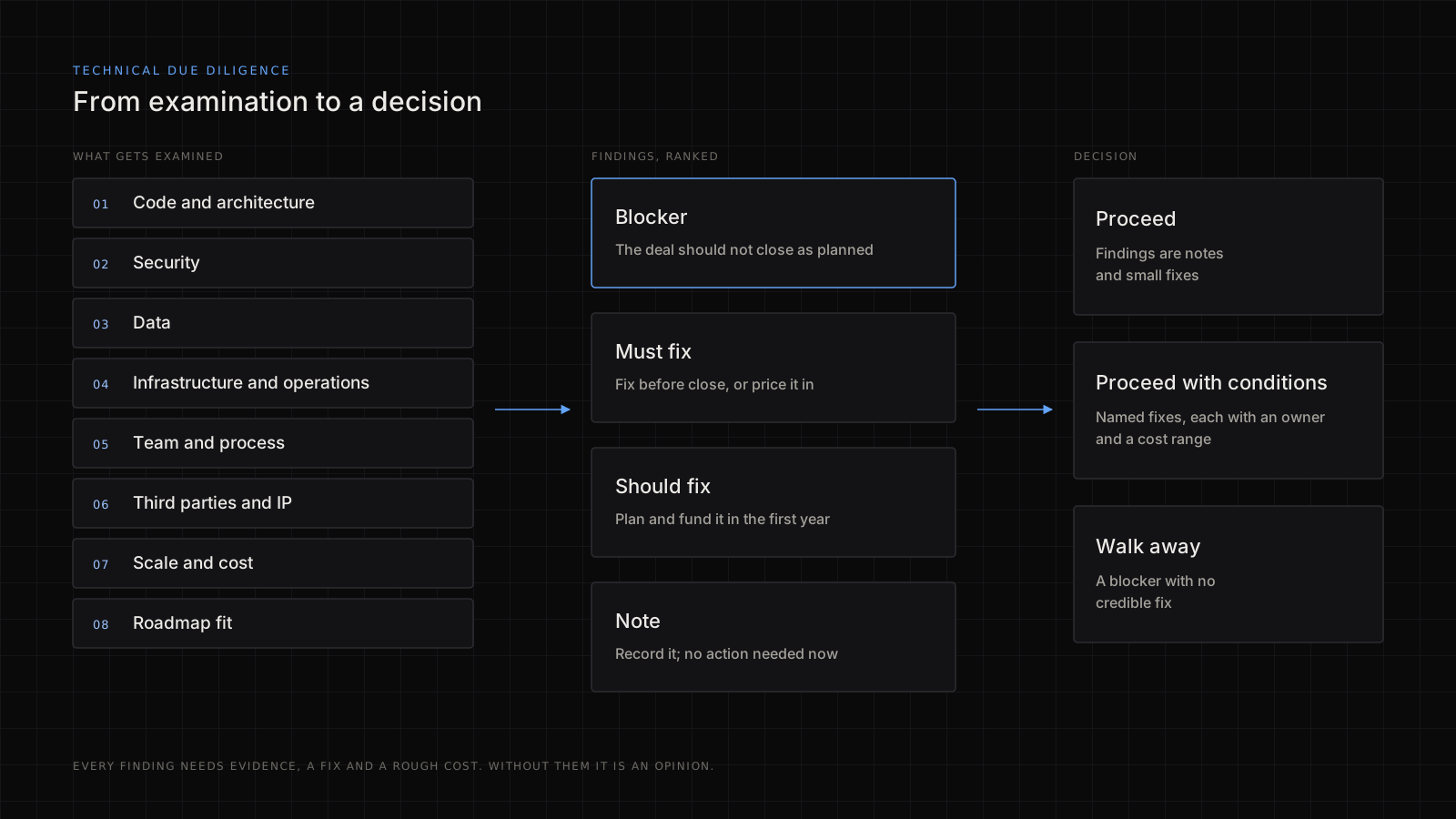
For every finding, write down four things: what is wrong, the evidence (the file, the command, the screenshot), the fix, and a rough cost as a range with its assumptions stated. A finding without evidence is an opinion, and a finding without a cost cannot change the price.
Then rank them. A blocker is something the deal should not close over as it stands. A must-fix is dealt with before close, or priced in. A should-fix is planned and funded in the first year. A note is recorded and left. The decision follows: proceed, proceed with conditions (named fixes, each with an owner and a cost), or walk away when there is a blocker with no credible fix.
When the findings say the platform or the architecture has to change after the deal, the choice between rehosting, refactoring, rebuilding and replacing is its own decision; I set out how I make it in legacy system modernisation.
If you are the one being examined
Diligence goes better, and faster, for the team that is ready for it:
- Write down the architecture in a page, and keep it true.
- Make the system buildable from a clean machine, and prove it.
- Update the dependencies, and know the licences.
- Rotate anything that ever leaked, and clean the history where you can.
- Restore a backup once, on purpose.
- Gather the contributor agreements before someone asks.
- Be open about the weak spots. A team that names its own debt is more credible than one that has none.
If nobody inside the company can own that list, getting the data room ready before a raise is one of the usual reasons to bring in a virtual CTO for a few months.
What diligence cannot tell you
It is a snapshot, taken from a sample, in a limited time. It cannot prove the absence of bugs or breaches, and it does not replace the legal and financial reviews that sit beside it. It also depends on access: a seller who will not show the code has already told you something.
What it can do is turn "we think it is fine" into a short list of specific, costed facts, before the money moves. When the code itself is the main question, a narrower source code audit goes deeper on it than diligence has time to.
Where to go from here
If you are about to buy, fund or inherit a system and want a second reader for it, my contract work is described on the hire page, and you are welcome to get in touch.