Legacy system modernisation: rehost, refactor, rebuild or replace
How to choose a legacy system modernization approach: rehost, replatform, refactor, rebuild or replace, the questions that decide it, and a safe cut-over.
Asghar Ali · Chief Technology Officer, Kakushin.io LTD
Legacy system modernisation (spelt "modernization" in most of the search results) is the work of moving a system that still runs the business onto a form that can keep changing at an acceptable cost and risk. There are five real approaches: rehost it as it is, replatform it with small changes, refactor it in place, rebuild it piece by piece, or replace it with a product. Choosing between them is mostly about two questions: is the code still a good description of how the business works, and is the platform underneath it the problem, or the code itself?
That is the short answer. The rest of this essay is how I answer those two questions for a real system, why "rewrite it from scratch" is almost always the wrong option on the list, and how to switch from old to new without a weekend that everyone remembers.
What counts as a legacy system?
A legacy system is one the business depends on but can no longer change safely, quickly or cheaply. Age is not the test. A ten-year-old service with tests, a build anyone can run and people who understand it is not legacy. A three-year-old app that nobody dares deploy on a Friday is.
The symptoms I look for, in roughly the order they cost money:
- Changes take weeks that should take days, because every change breaks something unrelated.
- Only one or two people can touch it, and the knowledge is not written down. Michael Feathers' working definition in Working Effectively with Legacy Code, "code without tests", is still the most useful one: without tests, every change is a guess.
- The platform is out of support: an operating system, runtime, framework or database version that no longer gets security fixes.
- It cannot integrate: no API, or an API nobody trusts, so other systems copy its data by export, screen-scraping or a shared database.
- It cannot pass a security review without a rewrite of its authentication or its handling of secrets.
- Running it costs more each year: licences, hardware, a hosting contract or a specialist contractor.
If none of these apply, the system is old but not legacy, and the best modernisation plan is to leave it alone.
The approaches, compared
The approaches have several names. Gartner's original list from 2010 had five Rs; AWS now teaches seven migration strategies (retire, retain, rehost, relocate, repurchase, replatform, refactor or re-architect). Under the labels, there are five different amounts of change:
| Approach | What changes | What stays | Typical risk | Choose it when |
|---|---|---|---|---|
| Rehost ("lift and shift") | Where it runs | The code, unchanged | Low | The hardware, data centre or hosting contract is the problem, not the software |
| Replatform | The runtime, database or hosting service, with small code changes | The architecture and business logic | Low to medium | The platform is out of support, but the code is sound |
| Refactor | The code's structure, in small safe steps | Behaviour, as users see it | Medium, spread out | The logic is right but expensive to change |
| Rebuild (re-architect) | The architecture, one capability at a time | The data and the business rules, carried across | High, unless done incrementally | The logic is right but the architecture cannot meet the new demands |
| Replace (repurchase) | Everything: you adopt a product | Your data, after a migration | Medium, concentrated at cut-over | The capability is commodity, such as payroll, CRM or ticketing |
Two more options belong on every assessment, because they are often correct: retire the system, if what it does is no longer needed, and retain it, if the cost of change is higher than the cost of living with it for another year. A modernisation programme that has never retired anything has usually not looked hard enough.
How to choose the right approach
Answer five questions in order. Each one removes options.
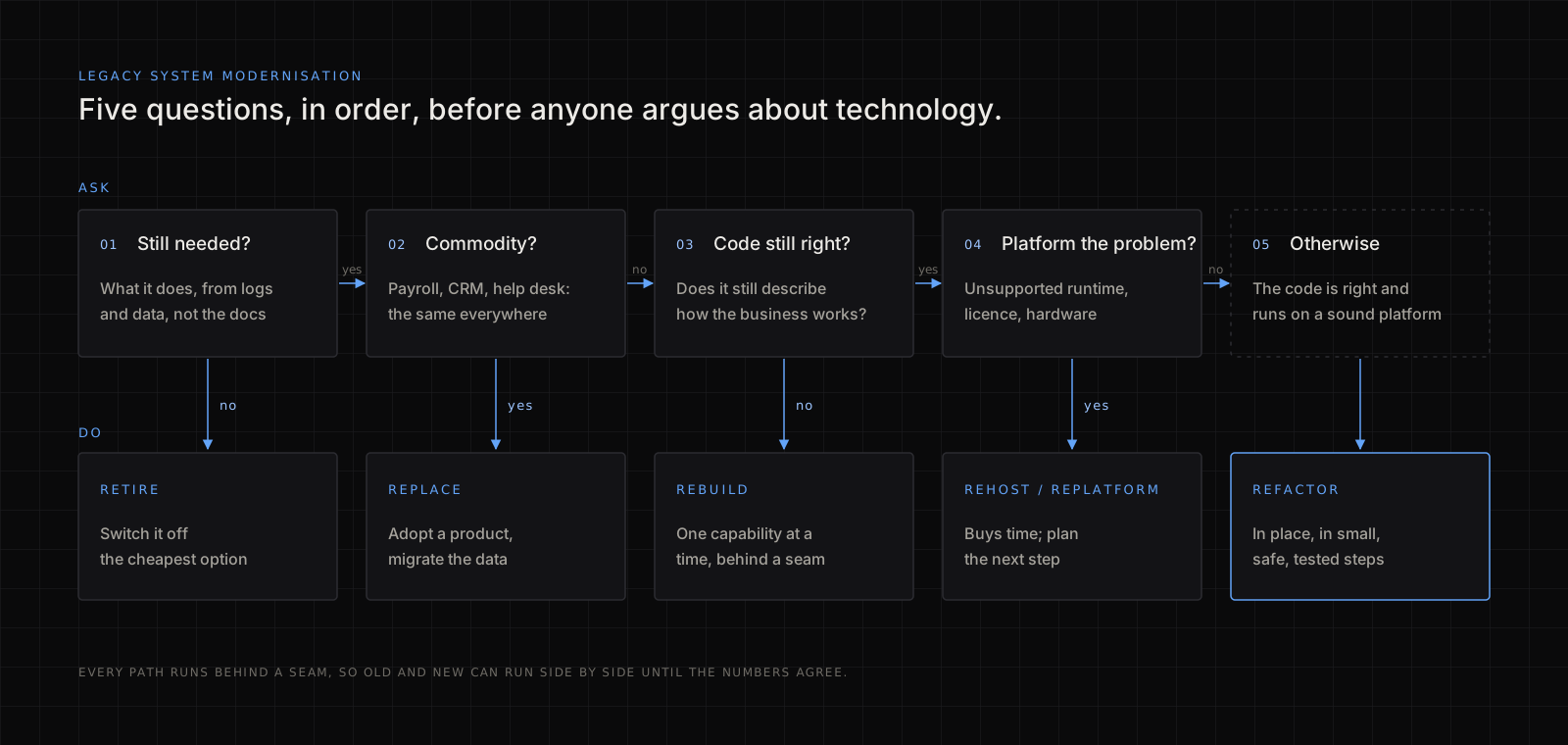
1. Is it still needed?
List what the system actually does, from its logs and its data rather than from its documentation. Features nobody has used in a year can be switched off before anything moves. Sometimes the whole system turns out to be doing one job that another system already does. Retiring is the cheapest modernisation there is.
2. Is the capability commodity?
If the system does what thousands of companies do in the same way, such as payroll, invoicing, a help desk or a CMS, the answer is usually to replace it with a product and spend the engineering on what makes the business different. The honest exception: a "commodity" system that has been customised for years has quietly become custom, and the product will not fit without the same customisation again. Count those customisations before signing.
3. Is the code still right about the business?
This is the question that decides between keeping the code and rebuilding it. Old code often encodes years of edge cases: the customer who is billed differently, the rule from a regulator, the workaround for a partner's broken file. Joel Spolsky's essay Things you should never do makes the case well: those ugly lines are bug fixes, and a rewrite throws them away. If the code is right but hard to change, keep it and refactor. If the business has moved on and the code describes a company that no longer exists, rebuild, one capability at a time.
4. Is the platform the main problem?
If the pain is an unsupported runtime, a database licence or a server that is about to be switched off, and the code itself is acceptable, rehost or replatform. These are the fastest approaches and they buy time, but they change nothing about how hard the system is to work on. Treat them as step one of a longer plan, not the plan.
5. What can the team actually run?
The best approach on paper fails if the team cannot operate the result. Microservices on Kubernetes for a team of three is a new legacy system in waiting. Choose the simplest target the team can deploy, monitor and fix at 2 a.m., and write down why.
Why a big-bang rewrite usually fails
A big-bang rewrite stops changes to the old system, builds a new one in parallel for months or years, then switches over in one go. It fails for predictable reasons:
- The target moves. The business keeps changing during the rewrite, so the new system chases a moving specification, or the old one keeps getting changes that have to be copied across.
- The hidden rules surface late. The edge cases nobody documented appear in the last month of testing, or in the first week of production.
- Nothing ships for a long time, so there is no feedback and no proof of progress, and funding gets harder to defend every quarter.
- The cut-over is all or nothing. If the new system fails on the day, the only recovery is going back, and by then the old one may be out of date.
The alternative is to change a running system one piece at a time, so that every step is small, reversible and in production within weeks.
How to modernise incrementally: the strangler fig pattern
The strangler fig pattern puts a routing layer in front of the old system, builds new capabilities behind it one at a time, and moves traffic across route by route until the old system has nothing left to do. Martin Fowler named it after the fig that grows around a host tree, and his later patterns of legacy displacement describe the full toolkit. In practice it is six steps:
Step 1: put a seam in front of the system
A seam is the place where you can redirect a request without the caller knowing: a reverse proxy, an API gateway, a message queue, or an interface inside the code. Every later step depends on it. Microsoft's description of the strangler fig pattern shows the façade version.
Step 2: protect the new code from the old model
The old system's data model is usually part of the problem. An anti-corruption layer translates between old and new, so the new services speak the business's current language instead of inheriting forty-column tables and status codes nobody can explain.
Step 3: pick the first slice for learning, not for value
The first capability to move should be small, well understood and low risk: a read-only report, a notification, a lookup. Its job is to prove the seam, the deployment pipeline, the monitoring and the rollback, not to deliver the biggest win.
Step 4: run old and new side by side
For each slice, send real traffic to both and compare the results before the new one is trusted. For reads, shadow the requests and diff the responses. For writes, use parallel change: expand to support both forms, migrate the callers, then contract. This is the same discipline I use when moving a calling product off Agora or Twilio: the old and new stacks run together until the numbers agree.
Step 5: move the data last, and deliberately
Data outlives code. Decide for each table which system owns it at each stage, keep a single writer at any time, and plan the backfill, the reconciliation report and the rollback before the first row moves. Two systems both writing to the same records is how modernisation projects lose money.
Step 6: switch off the old part
A slice is finished when the old code for it is deleted, not when the new one is live. Otherwise you are running two systems indefinitely, which is more legacy, not less.
What to measure
Measure the reason you started. If modernisation was meant to make change cheaper, these four numbers, taken before the first step and every month after, tell you whether it is working:
| Measure | What it tells you |
|---|---|
| Lead time for a change (commit to production) | Whether the system is getting easier to work on |
| Change failure rate | Whether speed is costing stability |
| Share of traffic on the new path | Real progress, as opposed to code written |
| Cost to run (hosting, licences, contractors) | Whether the business case is arriving |
The first two are the DORA delivery measures, and they are worth tracking anyway. If a quarter goes by and none of the four has moved, stop and ask why before spending the next quarter's budget.
Before you start: an assessment
Every approach above depends on knowing what you have. Before choosing, I read the system the way I would for a source code audit: the size and churn map of the code, who has changed what, which paths carry money and personal data, what the tests cover, and whether a clean machine can build it. If the modernisation is part of buying a company, the wider questions from technical due diligence apply too. The assessment is also the moment to fix the security debt that old systems collect: hard-coded secrets, shared admin accounts, missing authorisation checks. The application security list I enforce is the checklist I hold the target state to.
One newer trap: modernising with a code-generating assistant. Translating an old codebase with a model is fast, and it produces code nobody on the team has read. Generation got cheap; verification did not. Keep the tests and the side-by-side comparison, whatever writes the code.
FAQ
What are the main approaches to legacy system modernization?
There are five: rehost (move it unchanged), replatform (change the runtime or hosting with small code changes), refactor (restructure the code in place), rebuild (re-architect one capability at a time) and replace (adopt a product). Two more options are often right: retire the system, or retain it for now.
How long does legacy modernisation take?
A rehost or replatform can take weeks. Refactoring and incremental rebuilding are usually measured in quarters, but they should deliver something to production every few weeks along the way. If a plan shows no production change for six months, it is a big-bang rewrite, whatever it is called.
Should we rewrite the legacy system from scratch?
Rarely. A full rewrite discards years of edge cases encoded in the old code and delivers nothing until the end. Rewrite only when the code no longer describes how the business works, and even then rebuild one capability at a time behind a routing layer, so old and new can run side by side.
What is the strangler fig pattern?
It is an incremental modernisation method. You place a routing layer in front of the legacy system, build new capabilities behind it one at a time, move traffic across route by route, and delete the old code as each part is replaced. The old system shrinks until it can be switched off.
Is moving to the cloud the same as modernising?
No. Moving a system to the cloud unchanged (rehosting) changes where it runs and what it costs, not how hard it is to change. It can be a sensible first step when a data centre or hardware contract is ending, but the code, the tests and the architecture are still the same afterwards.
If you want a second pair of eyes on the plan
Architecture and system design, including the integrations onto existing systems of record and moves where old and new stacks run side by side, are part of the contract work on my hire page. I start with the assessment, agree which of the five approaches fits each part of the system, and stay through the first cut-over. If the modernisation is one of several big technical decisions arriving at once and nobody inside owns them, that points to a part-time virtual CTO rather than a one-off review.