API keys in mobile apps: why they leak and the relay fix
Any API key shipped in a mobile or front-end app can be recovered. Keep it on a relay proxy, then give that relay auth, rate limits and a hard spend cap.
Asghar Ali · Chief Technology Officer, Kakushin.io LTD
An API key shipped in a mobile or front-end app is public, however well it is hidden. OWASP's entry for this weakness says "anyone who downloads the package can recover it" (MASWE-0004, read on 6 November 2026), and OpenAI is blunt: "Never deploy your key in client-side environments like browsers or mobile apps" (OpenAI key safety guide, read on 6 November 2026). The fix is to keep the real key on a server you control and have the app call that server: a relay proxy. The relay then needs its own authentication, rate limits and spend caps, or it gives away the same account through a different door.
This is for the team shipping an iOS, Android or single-page app that calls a paid or sensitive API, and for whoever commissions that work. It covers where keys leak, which keys are meant to be on a device, what a relay changes and leaves open, and how to move an app already in the stores without breaking old versions. For the browser version with a worked demo, see secrets on the wrong side.
On the customer apps of a European national electricity utility, I introduced a relay-proxy architecture that removed every client API key from the shipped binaries. That is the experience behind this essay. The tables below are general guidance, not a description of that project.
Why can't you hide an API key in a mobile app?
Because the person you are hiding it from holds the device. The app has to use the key, so the key, or everything needed to rebuild it, sits on hardware the reader controls. Three common answers do not change that:
- Obfuscation. OWASP files obfuscation, white-box cryptography and runtime protection under "Harden Only as a Last Resort", because they "deter but do not prevent extraction" (MASWE-0004). The MASVS resilience group adds that such techniques "must not be used as a substitute for proper security architecture" (MASVS-RESILIENCE, read on 6 November 2026).
- The Keychain or Keystore. The right home for a per-user token your server issued. A shared vendor key still has to reach the device first, and then leaves it in a request.
- Certificate pinning. I used pinning on those utility apps as well. It helps against someone on the network impersonating your server. It does not hide anything from the person holding the phone, and OWASP's testing guide treats intercepting app traffic as a critical part of security testing.
Leaked keys also tend to keep working. GitGuardian, which sells secret scanning, counted 28.65 million new hardcoded secrets in public GitHub commits in 2025. AI-service secrets reached 1,275,105, up 81% on the year, and more than 64% of the valid secrets it found from 2022 were still valid when retested in January 2026 (State of Secrets Sprawl 2026, read on 6 November 2026). Those figures describe repositories, not app packages, but the last one is the one to remember: nobody is coming to revoke your key for you.
Where do API keys leak from a mobile or front-end app?
The OWASP Mobile Top 10 2024, the latest list as of 6 November 2026, opens with M1: Improper Credential Usage and calls hardcoded credentials in source or config files "a clear indicator of vulnerability". The first four rows below are the routes MASWE-0004 names; the rest are where I would look next.
| Where | How the key gets there | What to check this week |
|---|---|---|
| App source code | Compiled in as a constant | Search your release build for the prefix of every key you hold |
| Assets and config | Property lists, manifests, string resources, bundled files | Unpack your own APK or IPA and scan the contents |
| Libraries | An SDK's config or setup carrying a key | List what each SDK asks you to embed, and who pays for its use |
| Build leftovers | Staging URLs, source files, map files | Strip them from release packages |
| Front-end bundle | VITE_ and NEXT_PUBLIC_ values inlined at build time | Scan the built output, not only the source |
| Network traffic | The key travels in a request the device owner can read | On your own test device, list every third-party host the app calls |
| Logs | Debug logging or crash reports that capture headers | Search your logs for Authorization and for key prefixes |
| Repository history | A commit made before anyone noticed | Run a scanner over the full history once, then on every push |
Which keys are meant to be on the device?
Not every key is a secret. Ask one question: if a stranger copied this value, what could they do, and who pays?
| Key | On the device? | Why (provider docs, read on 6 November 2026) |
|---|---|---|
| Stripe publishable key | Yes | Stripe says it can go in front-end code or apps you distribute, and that only publishable keys are safe to expose |
| Firebase key restricted to Firebase services | Yes, with conditions | Firebase says it need not be treated as a secret, because Security Rules and App Check do the protecting. Never allow the Gemini Developer API on a public key |
| Google Maps client SDK key | Yes, restricted | Restrict it by app and by API. Google warns you are "financially responsible" for abuse of unrestricted keys |
| Short-lived token your server mints | Yes | Gemini's ephemeral tokens can be extracted too, but they expire quickly and can be restricted. Live API only at this time |
| AI provider keys, Stripe secret and restricted keys, SMS, email, database or admin credentials | No | They spend money or reach data. Google's Gemini docs say keys compiled into client-side code can be extracted by users |
What does a relay proxy change?
A relay is a small service you run between the app and the third party. The app sends a narrow request with its own credential. The relay checks it, adds the real key, calls the third party and returns the answer. MASWE-0004 lists this first among its mitigations, "keeping the static secret server-side".
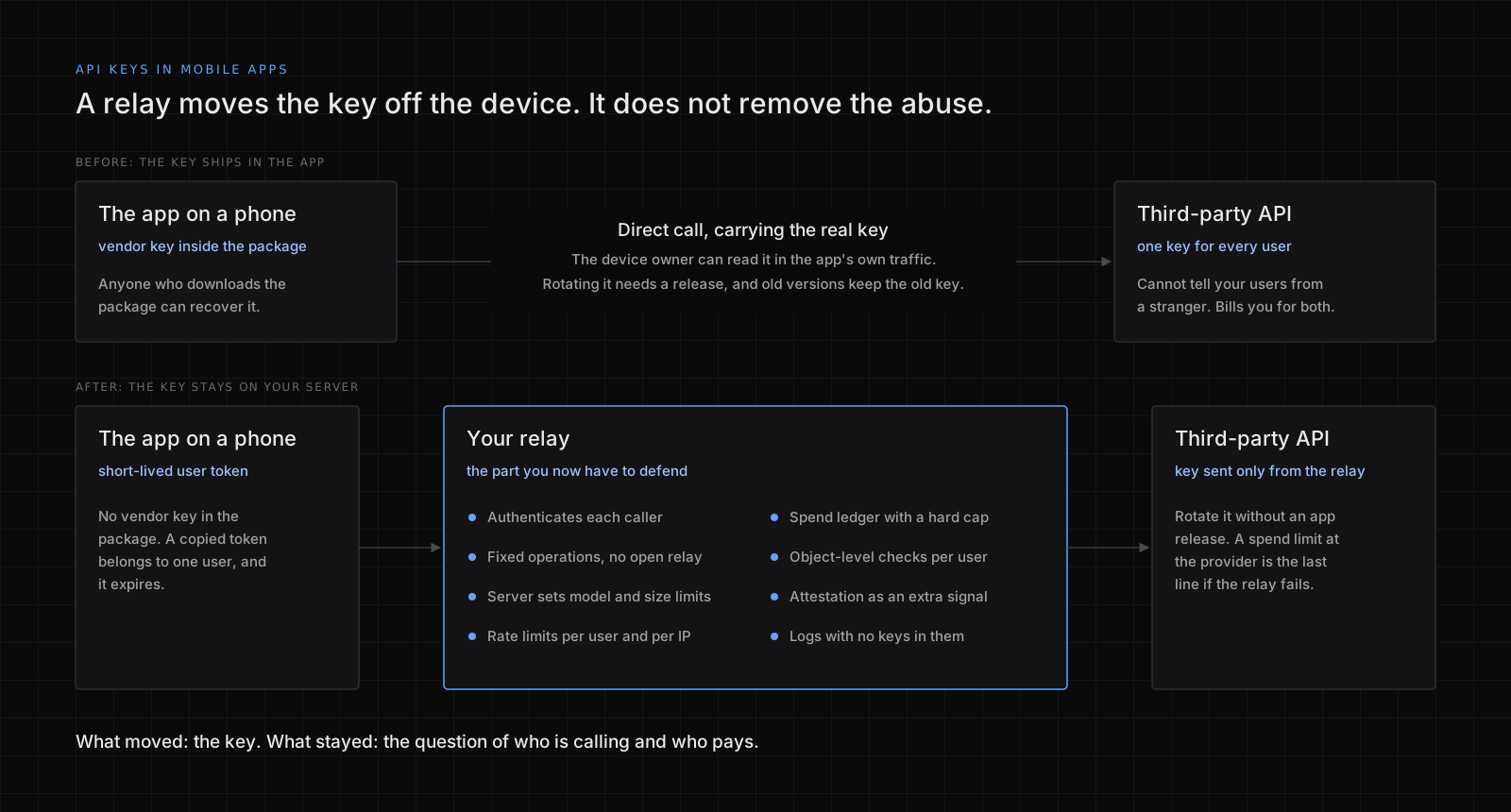
Three things improve:
- The key leaves the package. Future builds have nothing to recover.
- Rotation stops needing a release. Google notes that in Android and iOS apps, keys "aren't replaced until customers update their apps" (Maps security guidance). Behind a relay you change one server secret.
- You can tell callers apart. The third party sees one key. The relay sees which user asked, so you can limit, log or cut off one person.
What does a relay proxy not fix?
An unauthenticated relay is the same key with an extra hop. Whoever finds the URL spends your money, and the URL is as easy to find as the key was. Google says both in the same guidance: "Always require authentication for client access to the proxy servers" and "Don't allow clients to relay arbitrary API calls using the proxy."
This is the table I would review a relay against:
| Control | Why it matters | What a pass looks like |
|---|---|---|
| Caller authentication | A shared secret in the app is just another shipped key | Every request carries a per-user token that expires (MASWE-0004 suggests about an hour). No token or an expired one gets a 401 |
| Fixed operations | An open relay hands out your vendor account | One route per feature. The server builds the vendor request, and the client cannot choose the host, path or model |
| Request limits | Size is cost | The server caps input size and output length |
| Rate limits | Scripts do not get tired | Limits per user and per IP; over the limit gets a 429 |
| Spend cap | Alerts do not stop a bill | A hard limit at the provider, plus your own per-user ledger |
| Object-level checks | The relay acts for one user, on that user's data | A two-account test passes on every route |
| Attestation | It filters some scripts, not determined people | Verified on the server, and used alongside other signals |
| Logging | You cannot stop what you cannot see | Who, which operation, what it cost. No keys, tokens or auth headers |
| Upkeep | It is now a server you own | Key in a secret store, one per environment, rotation rehearsed, runtime patched |
Two rows need a source. On spend, OpenAI says "Spend alerts alone don't stop API traffic" and points to hard enforcement, noting that spend may slightly exceed the limit (read on 6 November 2026). OWASP's API4:2023 Unrestricted Resource Consumption asks for spending limits on all service providers. On a reference app I built AI spend controls with a per-IP ledger and abuse heuristics, and I put that ceiling first on any AI feature.
On attestation, Firebase App Check says it prevents some abuse but not all, and Google says Play Integrity should not be your sole anti-abuse mechanism (both read on 6 November 2026). A valid attestation is one more signal, not an identity.
How do you move a live app off an embedded key?
Order matters, because old versions keep calling with the old key until people update. This example is illustrative, not a client case: a made-up recipe app, version 3.2, has an AI vendor's key in a config file and calls the vendor directly.
- Assume the key is copied, and limit it today. Narrow its permissions and set a hard spend limit. If you can already see abuse, revoke it now and accept that the feature breaks in 3.2.
- Build the relay with a new key. Never reuse the exposed one. Work through the table above before any client calls it.
- Ship 3.3 with no key. Unpack the release build and confirm that neither the old key nor its prefix appears.
- Watch the old key. Its traffic should fall as people update. Traffic that holds steady, or comes from places your users are not, is probably someone else.
- Set a cut-off. Add a minimum-version check, warn people on 3.2 and pick a date.
- Revoke the old key, then stop it coming back. Deleting it from the code does not un-publish it, because old packages stay in circulation. Add a secret scan to the release pipeline.
How do you check your own build?
Only on apps you own. The MASWE-0004 page lists no MASTG tests for this weakness as of 6 November 2026, so write your own release check:
- Unpack your release APK or IPA; both are ZIP archives.
- Run a scanner over the files, such as gitleaks with its
dirmode, and search them for the prefix of every key you hold. - On a test device you control, capture the app's traffic and list each third-party host. A paid API called directly from the app is the red flag.
- Fail the build if anything turns up, on every release.
What this cannot tell you
- A clean scan is not proof. Scanners find known patterns, and a split or encoded key may not match. The better question is architectural: does this app need a vendor secret at all?
- I have no count of leaking apps. The GitGuardian figures cover public GitHub commits, and I did not find a primary source I would trust for app packages, so I quote none.
- Provider rules change. Everything cited here was read on 6 November 2026. Check your own provider's current docs.
- A relay review is not a penetration test. It says nothing about the rest of your API. The wider order of work is in application security best practices.
Frequently asked questions
Can I store an API key in the iOS Keychain or Android Keystore?
Store tokens your server issued to that user there. A shared vendor key still has to reach the device before it can be stored, and it leaves again in a request, so the keystore does not make it private. MASWE-0004 lists keystores as a separate mitigation, after keeping static secrets on the server.
Is restricting a key to my app's bundle ID enough?
It narrows what a copied key can do, and Google calls restriction best practice for Maps keys. It is not enough for a key that spends real money or reaches data. MASWE-0004 treats restriction as the fallback for secrets that must be hardcoded, to reduce the damage when they are exposed.
What about an app with no login?
That is the hard case, because there is no user to authenticate. Issue a short-lived token per install, add attestation, keep the limits low and put a hard cap on total spend, so your worst day has a known cost. Move expensive features behind a sign-in.
Should one relay key serve all my users?
For a third party with no idea of your users, usually yes, and the relay does the separating through per-user limits and logs. Where the service supports each user's own token, use that. It matters most when an AI agent calls tools, as I cover in AI agent tool permissions.
If you want this checked
I review mobile, web and AI apps for this: the release build and its traffic, the relay against the table above, two-account authorisation tests and a written fix list. The scope is on my hire page.