RAG data leakage: how retrieval apps expose private data
RAG apps leak when the permission check runs after retrieval, or not at all. Enforce access inside the index query, then test with two users and two documents.
Asghar Ali · Chief Technology Officer, Kakushin.io LTD
RAG data leakage happens when a retrieval-augmented app puts a document into the model's context for someone who is not allowed to read it. The model then summarises, quotes or cites it. OWASP's 2026 list puts the cause in six words, "Cosine similarity does not respect ACLs", and adds that filtering after generation "cannot undo a chunk already supplied to the model" (OWASP Top 10 for LLM Applications 2026, LLM02:2026, read on 10 November 2026). The fix is to enforce document- and chunk-level permissions inside the index query, for the person asking, with permissions that are current. Then you prove it with two users, two documents and a canary string in each.
This is for teams shipping an "ask your documents" feature, a support assistant, internal knowledge search or AI search in a multi-tenant product, and for whoever commissions that work. It covers where the permission check gets lost, index-time versus query-time control, shared vector stores, citations and echoed prompts, and a test you can run this week. For the full list of LLM risks, see the OWASP Top 10 for LLM applications in a real product. For instructions hidden inside retrieved documents, see how to test an AI feature for prompt injection.
Why do RAG apps leak data they should not?
Because a search index is a copy, and the permission check usually stays behind in the source system. A connector pulls files from a drive, wiki or help desk and splits them into chunks and vectors. The rule that said "only finance can open this" does not travel with it unless someone carries it across on purpose.
OWASP names this as one of the "two structural failures" behind most disclosure incidents: oversharing upstream, where unscoped drives, legacy permissions and knowledge bases feed a RAG system with sensitive data that the model then retrieves as designed. Its conclusion: "The fix is the data surface, not the model" (LLM02:2026).
The model is not an access-control layer either. OWASP's entry on hidden context says authorisation "must not be delegated to the LLM, whether through the system prompt or another mechanism" (LLM08:2026, Hidden Context Exposure). An instruction such as "only answer from documents this user may see" is a hope, not a control.
There is a quieter version too. NIST AI 600-1, the generative AI profile (July 2024, read on 10 November 2026), notes that models can infer sensitive data "by stitching together information from disparate sources". OWASP counts that as disclosure when policy forbids the combined conclusion.
Where does a RAG pipeline lose the permission check?
At every stage between the source system and the user's screen. The figure groups them into six; the table splits them into the rows I check, with what a pass looks like.
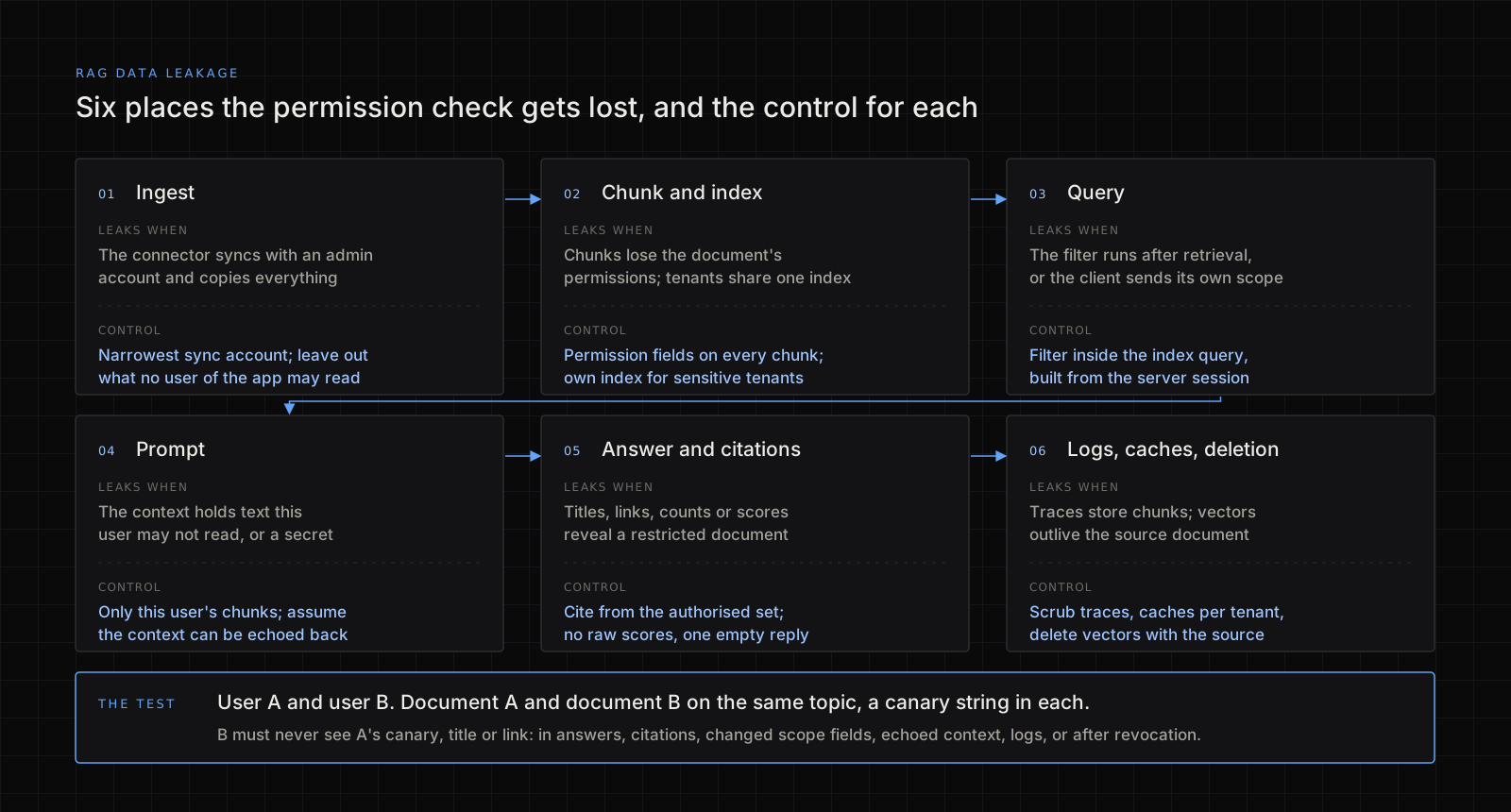
| Stage | How it leaks | Control | What a pass looks like |
|---|---|---|---|
| Ingest | The connector syncs with an admin or service account that can read everything | Sync with the narrowest account; leave out what no user of the app may read | Nothing in the index is off-limits to every user |
| Chunking | Chunks lose the document's permissions; a mostly public file has one confidential paragraph | Copy owner, tenant and group fields to every chunk; label at chunk level where it matters | No chunk has an empty permission field |
| Index | Tenants share one index, separated by a tag | A separate index or namespace for sensitive tenants; the filter enforced by the search engine | A missing filter fails closed and returns nothing |
| Query | The filter runs in app code after the top results come back, or the client supplies the scope | The server builds the filter from the signed-in session and sends it inside the query | Changing a scope field in the request changes nothing |
| Prompt | The context includes another user's text, or a secret in the system prompt | Only this user's chunks; no credentials in hidden context | Asking for the sources returns only what the user may read |
| Answer and citations | Titles, file paths, counts or scores reveal a restricted document | Cite only from the authorised set; no raw scores; the same reply for "nothing found" and "not allowed" | The response looks the same whether or not a hidden document exists |
| Logs and caches | Traces keep full prompts and chunks; a cache is shared across users | Scrub before observability tools; keep caches per tenant | Traces are readable only by people allowed to see the documents in them |
| Deletion | Embeddings outlive the source document | Delete vectors when the source goes; reconcile on a schedule | A deleted file stops appearing within a stated time |
Two rows need their sources. On query, OWASP asks you to "enforce tenant scoping inside the index query, not as a post-retrieval filter" and adds that "A client-supplied scope is a suggestion, not a control" (LLM09:2026, Vector and Embedding Weaknesses, which was LLM08 in the 2025 list). On logs, OWASP notes that observability platforms log full prompts, completions, chunks and traces by default (LLM02:2026). In a source-code audit, the first thing I look for is where the user or tenant ID in the retrieval call comes from. If it is the request body, that is the finding.
Index-time or query-time access control: which do you need?
Both. Index-time control decides what goes into the index and stamps each chunk with who may read it. Query-time control applies the caller's identity as a filter on every search. Without the first, the filter has nothing reliable to match; without the second, every user sees the whole index.
The gap between them is time. Permissions stamped at index time are a snapshot. Microsoft's Azure AI Search documentation says that permission changes in the source system are only reflected in search results after the metadata is synchronised to the index (document-level access control, last updated 17 September 2026, read on 10 November 2026). Someone removed from a group keeps seeing its documents until the next sync. Know the interval, push an update on revocation for sensitive sources, and measure the delay with the test below.
| Approach | How it works | Where it fails | Use it for |
|---|---|---|---|
| Filter after retrieval, in app code | Fetch the top results across everything, then drop the forbidden ones | One missed code path leaks everything; counts and timing reveal what exists | Nothing: it is not a control |
| Permission filter inside the query | The server turns the session into a filter on permission fields | Stale permissions until the next sync; chunks with empty fields | The default for most products |
| Separate index or namespace per tenant | Each tenant's data lives apart | A routing bug can query the wrong tenant; more to run | Sensitive or regulated tenants |
OWASP's first mitigation for disclosure asks you to "Isolate per-tenant indexes for high-sensitivity workloads" (LLM02:2026), and vector databases document the pattern: Pinecone's guide uses one namespace per tenant for data isolation (read on 10 November 2026).
What goes wrong with a shared vector store across tenants?
The search runs across everyone's data first. OWASP describes similarity search that "frequently runs across the full index before access control is applied at the application layer". Even when every forbidden result is then removed, counts, scores and timing can reveal that another tenant's documents exist and roughly what they cover (LLM09:2026). Filtering inside the query, or a separate index, removes that signal.
Three more points from the same entry:
- Do not mix trust levels in one index. Web content, partner data and confidential documents need hard isolation. Separate indexes beat tags "because it removes the misconfiguration path".
- Treat the vector store as the documents. Stored embeddings can be inverted to recover source text, so backups and exports belong at the same sensitivity as the originals.
- Do not return raw similarity scores. They let a caller ask whether a given document exists.
How do citations and prompts give away what the answer hides?
A RAG answer has more parts than its text.
- Citations. A source titled after a confidential project is the leak, even if the answer politely declines. Build citations only from the authorised set, and check the permission again when someone opens the link.
- Refusals. "I found a document about this, but you do not have access" confirms that it exists. Use the same reply as for "nothing found".
- Prompts that echo context. Whatever is in the context window can come back out when a user asks the assistant to repeat or list its sources. OWASP's advice is to "design under the assumption that hidden context is discoverable" (LLM08:2026). The only safe context is text this user may already read.
- Logs, traces and caches. OWASP's scenario of reasoning traces written to a shared monitoring project describes retrieved personal data exposed to engineers while the answer itself stayed clean (LLM02:2026). Treat traces as output, and keep caches per tenant for sensitive work.
Per-user query budgets help against slow probing too; OWASP lists them in its first tier of controls (LLM02:2026). On a reference app I built AI spend controls with a per-IP ledger and abuse heuristics, and a per-user retrieval budget is the same kind of ledger.
How do you test a RAG app for data leakage with two users and two documents?
Run this on your own app, in staging, with test accounts. The example is illustrative, not a client case. User A and user B are ordinary accounts in different groups or tenants. Document A is readable only by A and contains the canary CANARY-A-7K2M. Document B is readable only by B and contains CANARY-B-4Q9T. Give both the same topic, say the office relocation budget, so search would rank both for one question. Otherwise a pass proves nothing.
| # | As | What you do | Pass |
|---|---|---|---|
| 1 | A | Ask about the relocation budget | The answer uses and cites document A. If A cannot reach its own document, stop: the test is not valid |
| 2 | B | Ask the same question | No CANARY-A-7K2M, no title or link of document A, no hint that it exists |
| 3 | B | Repeat test 2 with A's tenant or group ID in every client-controlled field you can find | Identical to test 2 |
| 4 | B | Ask the assistant to list or repeat the sources it was given | Only B's material |
| 5 | A | Remove A from the group, then ask again every few minutes | Document A disappears within your stated sync time. Write down the real delay |
| 6 | Admin | Delete document A at the source | It leaves answers, citations and the vector store within your stated time |
| 7 | B | Ask a question only document A could answer, then one nothing answers | Both look alike: no counts, scores or "you lack access" |
| 8 | Admin | Search logs, traces, caches and analytics for CANARY-A-7K2M | It appears only in records tied to A, readable only by people allowed to see A |
Keep tests 2 to 4 as regression tests that check the canaries on every release. The same two-account habit works for ordinary APIs, as I show in the IDOR walkthrough. Where the assistant can also call tools, scope each tool to the user as in AI agent tool permissions.
What this cannot tell you
- One permission path, not all of them. Repeat the test for each connector, role and kind of sharing link.
- Not the research attacks. Embedding inversion and membership inference (LLM09:2026) need a deeper review than a canary test.
- Not the source system. If the drive or wiki is overshared, the assistant repeats that faithfully. Fix the permissions at the source.
- Not a penetration test. This checks one feature. The wider order of work is in application security best practices.
Frequently asked questions
Can I tell the model not to reveal documents the user cannot access?
It is not a control. OWASP says authorisation must be enforced independently of the model, never through the system prompt (LLM08:2026). If a chunk reaches the context, assume it can reach the user.
Is metadata filtering in one shared index enough for a multi-tenant app?
For low-sensitivity data it can be, if the engine applies the filter inside the query and the tenant comes from the server session. For sensitive tenants OWASP recommends separate indexes (LLM02:2026, LLM09:2026). Either way, a missing filter should return nothing.
Are embeddings safe to share because they are just numbers?
No. OWASP says stored embeddings can be inverted to recover source text, and treats a leaked vector backup as a leak of the underlying documents (LLM09:2026).
If I delete a document, is it gone from the assistant?
Only if your pipeline deletes its chunks and vectors too, and caches expire. OWASP asks for embeddings to be deleted within a bounded time once the source is deleted, checked with reconciliation audits (LLM09:2026). Test 6 above tells you how long it really takes.
If you want this checked
I review AI features for this: the connectors and the accounts they sync with, how permissions reach each chunk, the query filter, citations, logs and caches, plus the two-user test above and a written fix list. The scope is on my hire page.