What a video call should say to a screen reader, and what I have not verified
The design decisions inside call-a11y, an open-source library for call accessibility: why joins are batched on a fixed clock, why words still being recognised are never spoken, why a modal dialog silences your announcer, and the parts I could not check with a real screen reader.
Asghar Ali · Chief Technology Officer, Kakushin.io LTD
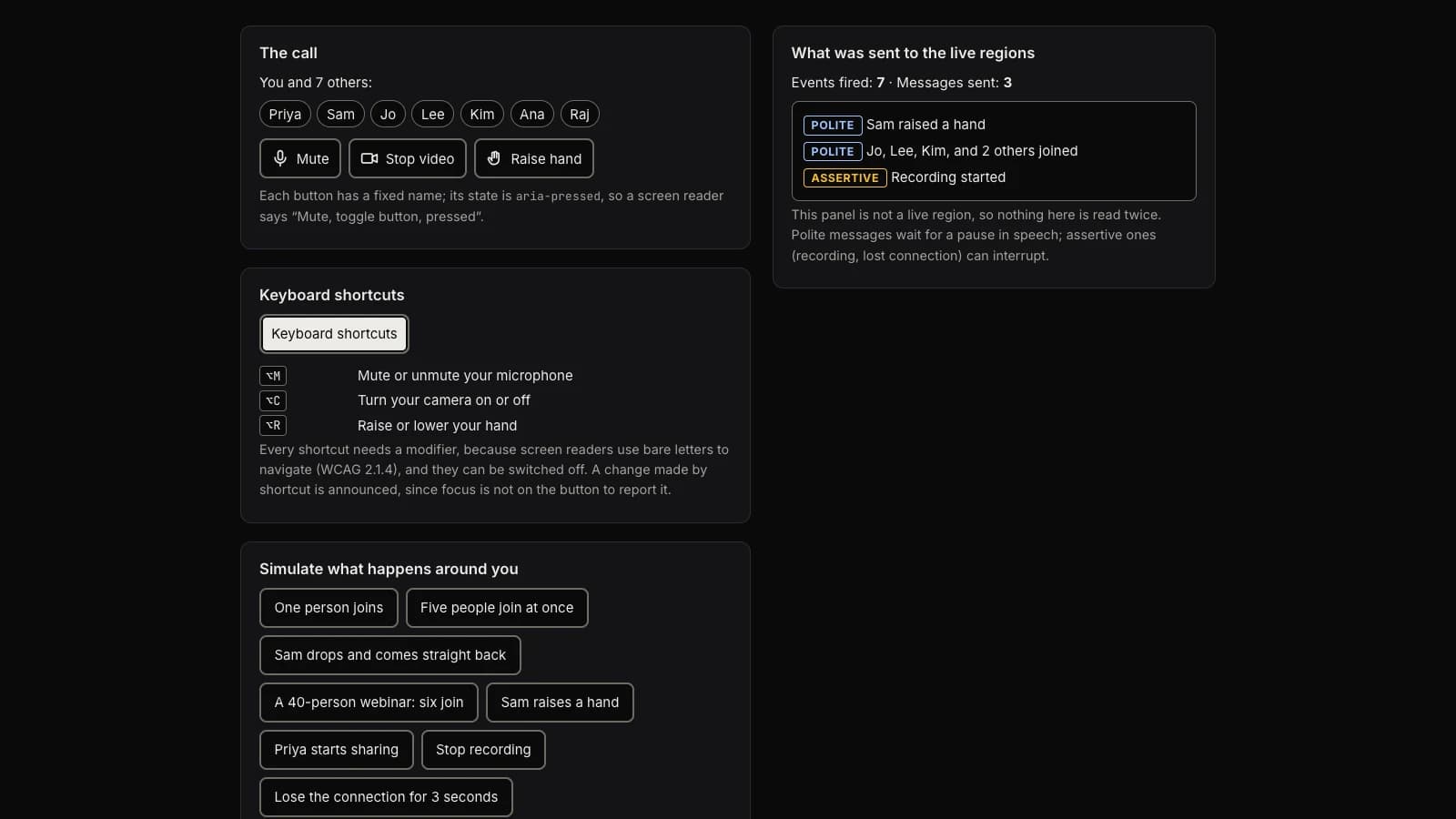
In What a screen reader user hears in your video call I listed the five problems I find most often in call interfaces. Since then I have put the fixes into code: call-a11y, a small open-source library that takes events from whatever call stack you use and decides what a screen reader is told, and when. There is a live demo, a simulated call with a panel beside it listing exactly what was sent to the live regions.
Most of it is unsurprising once you have decided to do it. A handful of decisions were not, and one whole category I could not settle. These are those, in the order I made them.
Say joins once, on a fixed clock
The obvious way to stop thirty join announcements in a row is to debounce: collect joins, and when things go quiet for a second, say them. In a busy call things never go quiet, so a debounce can hold an announcement back indefinitely.
The library starts a window at the first event and says everything collected when the window ends, 1.2 seconds by default, whatever else has arrived. Five people joining at once becomes "Jo, Lee, Kim, and 2 others joined": three names and a count, because a list of ten names is just a different kind of noise.
The window has a second use. Someone whose connection blips leaves and comes straight back. To a sighted user that is a tile flickering; announced faithfully it is two sentences about nothing. Inside the window, a leave followed by a join of the same name says nothing, and so does a join followed by a leave. Past twenty participants the names go entirely ("5 people joined, 41 in the call") over a longer window, because at that size an individual arrival is not information.
A backlog is worse than a gap
Updating one live region again too quickly can cut the earlier message off, so messages in a region are spaced apart, 400 ms by default. That creates a queue, and a queue in a call goes stale in a way it does not elsewhere: hearing what happened a minute ago is worse than missing it.
Two rules follow. A message can carry a key, and a queued message with the same key is replaced by a newer one, so flipping the microphone off, on, off quickly leaves one "Microphone off" instead of a replay of all three. And the queue is capped at five per region, oldest dropped.
The region has to exist first, and a modal silences it
Two facts about live regions decide whether anything is heard at all.
First, a region that is created and filled in the same moment is often not announced. So the announcer creates its two regions, one polite and one assertive, up front, and waits 100 ms before the first message.
Second, a native <dialog> opened with showModal() makes everything outside it inert. I checked what Chrome does with that by reading its own accessibility tree over the DevTools protocol: with the modal open, the live regions outside the dialog are no longer in it. An announcer mounted on document.body goes quiet the moment a settings dialog opens, and nothing in the page tells you. The fix is a container option, so a second announcer can live inside the dialog while it is open, and the library's browser tests reproduce the problem so it stays documented rather than remembered. That is one browser; I have not checked the others.
Never speak the words that are still changing
Live captions arrive as a stream of revisions: "hel", "hello wor", "Hello world." Speaking each one would be unintelligible, so unsettled text is never announced, in any mode.
Settled captions are a different question. Most screen reader users can hear the call, and a second voice reading the captions over it is noise, so by default nothing pushes captions at the reader. They sit in a log, role="log" with aria-live="off", which can be browsed and scrolled without interrupting anyone. There is an opt-in for the reader who cannot hear the call, such as a deaf-blind user on a braille display: settled captions are spoken, joined per speaker, and your own voice is skipped, since you know what you just said.
The log also stops following the newest caption while you have scrolled up or have focus inside it, with a button to resume, so the text does not move under someone who is reading it. That is WCAG 2.2.2, Pause, Stop, Hide.
Shortcuts: a modifier is required, and keyboards disagree
The first essay explained why a bare-letter shortcut fights a screen reader that uses those letters to navigate. So the library refuses to create one: bind m and it throws, with the reason, unless you opt out and promise a way to switch shortcuts off.
Two things I had not planned for. On many Windows layouts, AltGr is reported as Ctrl+Alt and is used to type characters, so a Ctrl+Alt shortcut can fire while someone is typing an @ or a €; the library ignores AltGr. And on a Mac, Option+M types "µ", so matching on the key's value alone never sees an M; for Alt and Shift combinations it also matches the physical key. Both are covered by tests. Both tests use synthetic key events: I have not run them on a real AltGr keyboard.
What I have not verified
This is the part I would want to read first if I were considering using it.
- No real screen reader. The library has 129 unit tests and 13 checks in real Chrome, including axe-core with colour contrast and the browser's accessibility tree. They show which region received which text, in what order, with which roles and names. They cannot show what NVDA, JAWS, VoiceOver or TalkBack then say, and screen readers disagree about live regions in ways only a listening person finds.
- The numbers are guesses. 100 ms, 400 ms and 1.2 seconds are reasonable, not measured.
- The toggle may be spoken twice. Press a mute button and the screen reader reports the button's new pressed state; the library also says "Microphone off". Whether that is a repeat or the only thing you hear depends on the screen reader. I made the default say it twice rather than not at all, and there is an option to skip it.
- One browser. Chrome only. Nothing has been run in Firefox or Safari.
That is why the repository has a ten-scenario test protocol and an issue form. If you use a screen reader, fifteen minutes with the demo is the most useful thing you can do for this project, and a report that says "it all worked" is as valuable as one that reports a bug: it is the only evidence there is for that pairing of screen reader and browser.
Using it
npm install call-a11y
The project page has the short version, the README has the API, and it is MIT licensed. It is a set of building blocks, not a conformance claim about anyone's product: accessibility-aware, not certified.