Open source · September 2026
call-a11y: deciding what a screen reader hears during a video call.
A video call changes state every few seconds, and a screen reader user hears only what the interface chooses to say. This is a small open-source library, zero dependencies with optional React bindings, that takes the events from whatever call stack you use and decides what to say and when. It is the advice in What a screen reader user hears in your video call written as tested code.
The gap
The failures are small, common, and easy to miss without listening.
A mute button announced only as “button”. A join banner nobody hears. Thirty join announcements in a row in a large meeting. A bare-letter shortcut that fires when someone only wanted to move around the page. None of these needs a new technique. Each needs a decision about what to say, when, and how urgently, made once and made carefully.
I have been building video calling on WebRTC since 2015. The media layer gets most of the engineering attention; the interface around it gets less, and for a screen reader or keyboard user that is where a call usually breaks. I did not find a package that took call events and turned them into sensible announcements, so I wrote one.
What it does
Four small pieces, each doing one thing.
Announcements
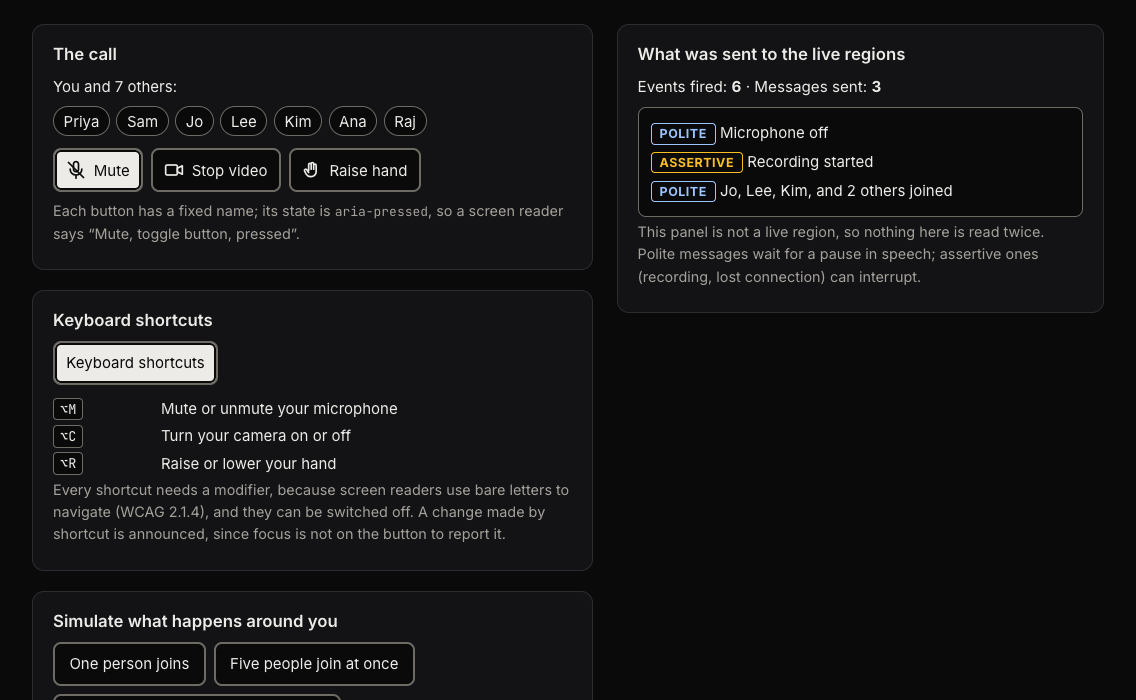
Two persistent live regions, one polite and one assertive, with a queue in front of them. The regions exist before the first message, messages are paced so they do not cut one another off, and a queued microphone-off is replaced by a newer microphone-on instead of piling up behind it.
Call events
Joins, leaves and raised hands are collected over a fixed window and said once: “Jo, Lee, Kim, and 2 others joined”. Someone who drops and comes straight back is not news. Above twenty people it says counts, not names. Recording starting and the connection dropping are assertive, because they need to be heard now.
Live captions
A model for captions from a streaming speech recogniser: unsettled results replace each other, settled ones merge into a speaker’s paragraph. Unsettled text is never spoken, and settled captions are spoken only if asked, so a reader who can hear the call is not read to twice.
Shortcuts
Call shortcuts that must carry a modifier, because screen readers use bare letters to navigate (WCAG 2.1.4). They ignore key repeat, input-method composition and AltGr, work with Option on a Mac and on non-Latin layouts, and can be switched off.
There are also React bindings: a provider, hooks, a caption log component and a toggle button with a fixed name and aria-pressed. The core is about 4.3 KB minified and gzipped; the React entry, which includes it, about 5.7 KB.
The rules
What it follows, and where each rule comes from.
| Rule | Where | WCAG 2.2 |
|---|---|---|
| A control’s name does not change with its state; the state is aria-pressed | Toggle button | 4.1.2 Name, Role, Value |
| Status changes reach assistive technology without moving focus | Announcer | 4.1.3 Status Messages |
| Character-key shortcuts need a modifier, or can be turned off | Shortcuts | 2.1.4 Character Key Shortcuts |
| Auto-updating text can be paused | Caption log | 2.2.2 Pause, Stop, Hide |
| The visible label and the accessible name match | Toggle button | 2.5.3 Label in Name |
| Targets are large enough to hit | Styles | 2.5.8 Target Size (Minimum) |
Honest status
What has been tested, and what has not.
An accessibility library that overstates what it has been checked against is worse than none, so this is stated first and plainly.
129 unit tests cover every behaviour above, including React StrictMode, server-safety and axe-core runs on the rendered components.
13 checks in real Chrome drive the demo, read Chrome’s own accessibility tree (names, pressed state, live-region politeness, and what an open modal dialog removes from it) and run axe-core with colour contrast in both colour schemes.
Any real screen reader. Nothing has been run with JAWS, NVDA, VoiceOver or TalkBack, or in Firefox or Safari. The tests prove the DOM and ARIA mechanism; they cannot prove what a given screen reader says.
The timings (100 ms before the first message, 400 ms between messages, a 1.2 s batching window) are reasonable guesses, not measured constants, and one default, whether to announce a change the toggle button already reports, depends on how each screen reader behaves.
Help wanted
If you use a screen reader, fifteen minutes with the demo is the most useful thing you can do.
Ten scenarios, each with what the library sends and what to listen for, and an issue form for the result. “It all worked” is as useful as a bug: it is the only evidence there is for a screen reader and browser pairing.
Use it
Install, then tell it what happens.
$npm install call-a11yimport { createAnnouncer, createCallAnnouncer } from 'call-a11y'
// Create once, when the call screen loads: the live regions
// have to exist before the first message.
const announcer = createAnnouncer()
const call = createCallAnnouncer(announcer)
// Event names are illustrative; use your SDK's.
room.on('participantJoined', (p) => call.participantJoined(p.name))
room.on('reconnecting', () => call.connectionChanged('reconnecting'))
room.on('recordingStarted', () => call.recordingChanged(true))The README covers the React bindings, localising the messages, the caption log and the shortcut rules. MIT licensed.