Prototype · September 2026
PC1 workflow: knowing where every project document is, without making a phone call.
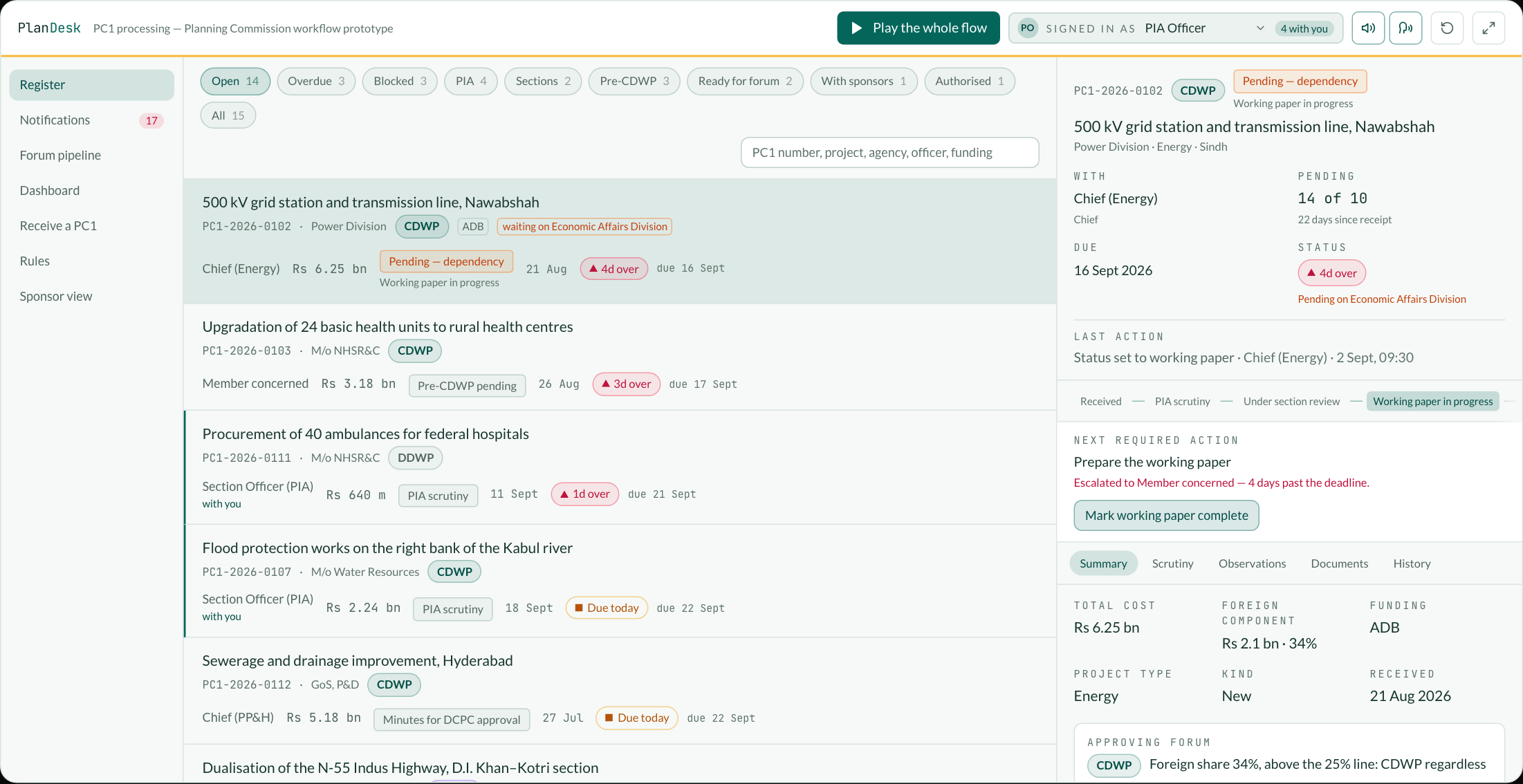
Every public-sector scheme in Pakistan starts as a PC1, and the Planning Commission receives them in volume. The process is well defined and the timelines are published. What is missing is the layer that keeps track: which PC1 is where, who is holding it, how many days it has been there, what it is waiting on, and whether it can make the next CDWP. This is a working prototype of that layer — the data is fictional and it runs entirely in your browser. The guided run takes one PC1 the whole way, performing every step for real as it explains it.
The gap
The process is not the problem. Knowing where things are is.
A PC1 passes through the PIA Section, a technical section, a Chief, a Member, a pre-CDWP, a forum and back to the PIA Section for authorisation, and at several points it goes out to the sponsoring agency and waits. Each of those handovers is a place where a file can stop moving without anybody noticing, and the volume is high enough that noticing is not realistic by hand.
So the gap is filled by memory and telephone. What happened to that PC1? Who has it? How many days has it been pending? Has the working paper been prepared? Is it going to this CDWP? Every one of those questions has an exact answer that a system already holds the inputs for.
The Commission has published the timelines — a memorandum of 12 August 2025 sets working-day limits for each step from receipt in the PIA Section to the ECNEC sitting. A published deadline that nothing measures is a statement of intent. Measured, it becomes a queue that sorts itself.
The chain
The chain, each step with a clock and a named desk.
The flow below is the published process and the numbers on it are the published deadlines. Three parts of it are drawn wrongly more often than not: the ECNEC is a step after the CDWP rather than an alternative to it, the forum’s decision is followed by the minutes going to the Deputy Chairman, and a file goes back to the sponsoring agency at three separate points.
Submission
A sponsoring agency — a federal ministry, a division, or a provincial P&D department — submits the PC1 for a PSDP-funded scheme.
PIA scrutiny
The Public Investment Authorization section checks it against the PC1 checklist. Two days to clear it or send it back; a PC1 that fails goes to the agency with the points that failed, not a phone call.
Routing
A cleared PC1 goes to the concerned technical section by subject: a road to Transport & Communication, a building to Physical Planning & Housing, a hospital to Health. The routing is a rule, so it is visible and arguable.
Working paper
The section reviews the scheme and drafts the working paper, five to ten days depending on the section.
Pre-CDWP
The Member concerned holds the pre-CDWP within fifteen days of the PC1 reaching the section. Internal sections settle what they can before the file reaches a forum.
Observations
Anything unsettled goes back to the sponsoring agency as observations, with fourteen days to answer. This is where most of a file’s elapsed time actually goes.
Forum
A cleared file is listed for the forum its cost and funding put it in front of: below Rs 1 bn and locally funded, the sponsor’s own DDWP; otherwise the CDWP.
Minutes to the DCPC
The forum’s decision is not the end of it. The minutes go to the Deputy Chairman for approval within three days, and only then does anything follow from what the forum decided.
The ECNEC, where it applies
Above Rs 7.5 bn the CDWP does not approve — it recommends. Seven days to prepare the summary and the ECNEC presentation, and the scheme goes to the ECNEC, which approves it.
Authorisation
Five days to issue the authorisation, and then the project moves on to PC2, PC3 and PC4. A deferred scheme instead goes back to the sponsor within one day.
Routing
Which forum, and why, computed rather than remembered.
Cost and funding decide the approving forum. The prototype derives it on entry and shows the rule that produced it.
| Scheme | Forum | Why |
|---|---|---|
| Up to Rs 1 bn, locally funded | DDWP | The sponsoring ministry’s own Departmental Development Working Party is competent. These should not reach the Commission at all, and the prototype flags them at scrutiny. |
| Rs 1 bn – 7.5 bn, locally funded | CDWP | The Central Development Working Party, chaired by the Deputy Chairman, Planning Commission. |
| Above Rs 7.5 bn | CDWP, then ECNEC | Not an alternative to the CDWP but a step after it: the CDWP considers the scheme and recommends it, and the Executive Committee of the National Economic Council approves. |
| Foreign share above 25% | CDWP / ECNEC | Whatever the cost. A Rs 800 m scheme with a World Bank component is not a DDWP case. |
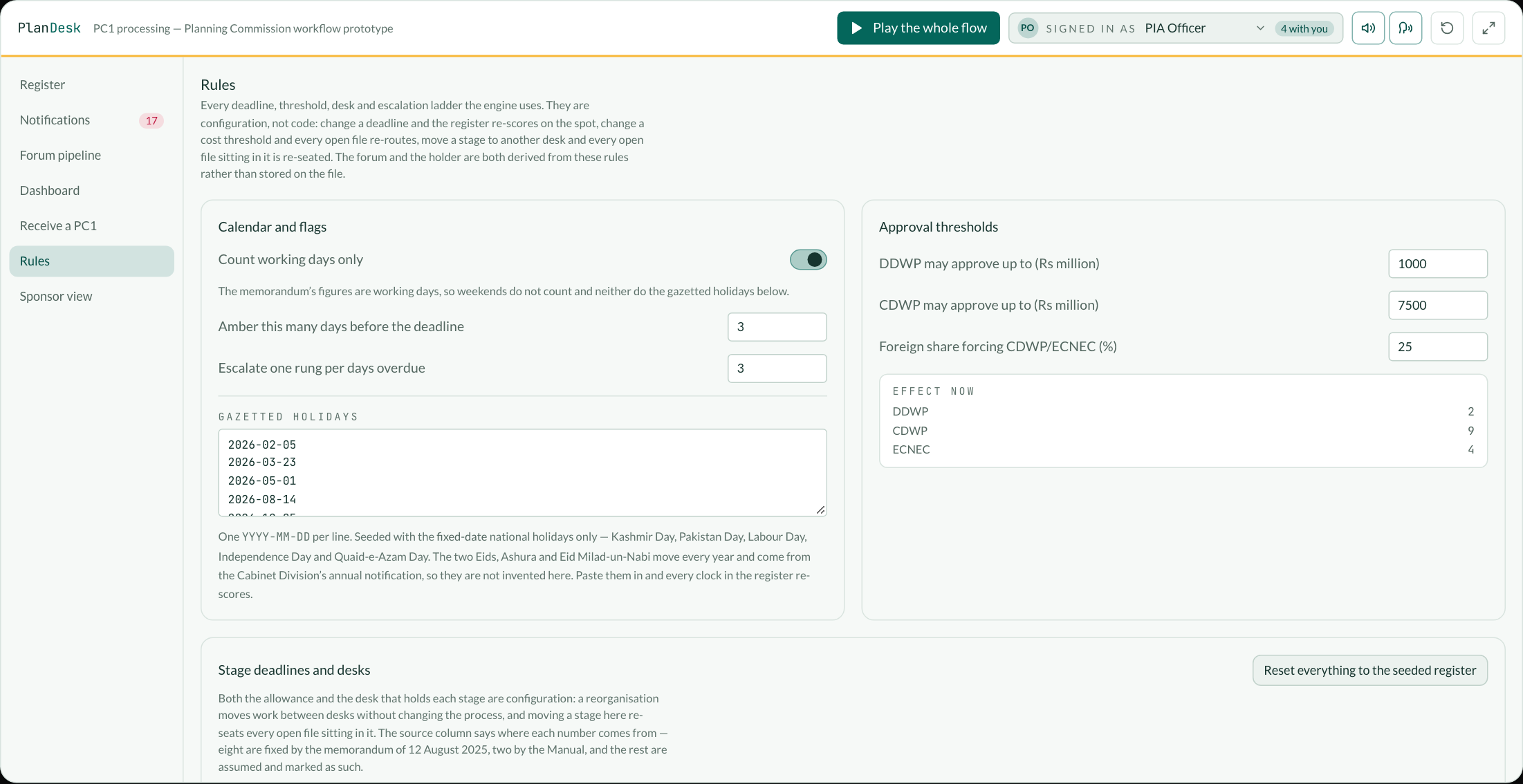
These are the limits in force, from the Manual for Development Projects 2024. They are also the numbers most likely to change, which is why they sit in a settings screen: edit a threshold in the demo and every open file re-routes on the spot.
What it adds
A monitoring layer, not another document store.
IPS already takes the PC1s. What follows is what has to sit on top of that for a file to stop going quiet.
Every PC1 has a clock.
Each status carries a deadline in working days. The register shows days elapsed, days remaining and a green, amber or red flag, and sorts by how far past its deadline a file has run rather than by date received — because the oldest file is often the one legitimately waiting on a forum date while a three-day-old one has already blown a two-day scrutiny.
Nothing is pending with nobody.
A status implies a desk and a named officer; the app derives both and will not let a file sit in a state with no holder. The record answers where it is, who has it, how long it has been there and what has to happen next, in one header.
Dependencies are first-class.
A clock says how long a desk has held a file. It never says why. When progress waits on the Economic Affairs Division, another section, Finance, or the sponsor’s compliance, that is recorded as a dependency with an owner, the date it was asked for and the date it was expected — and it is visible in the register as “Blocked”, not buried in a file.
Reminders and escalation are automatic.
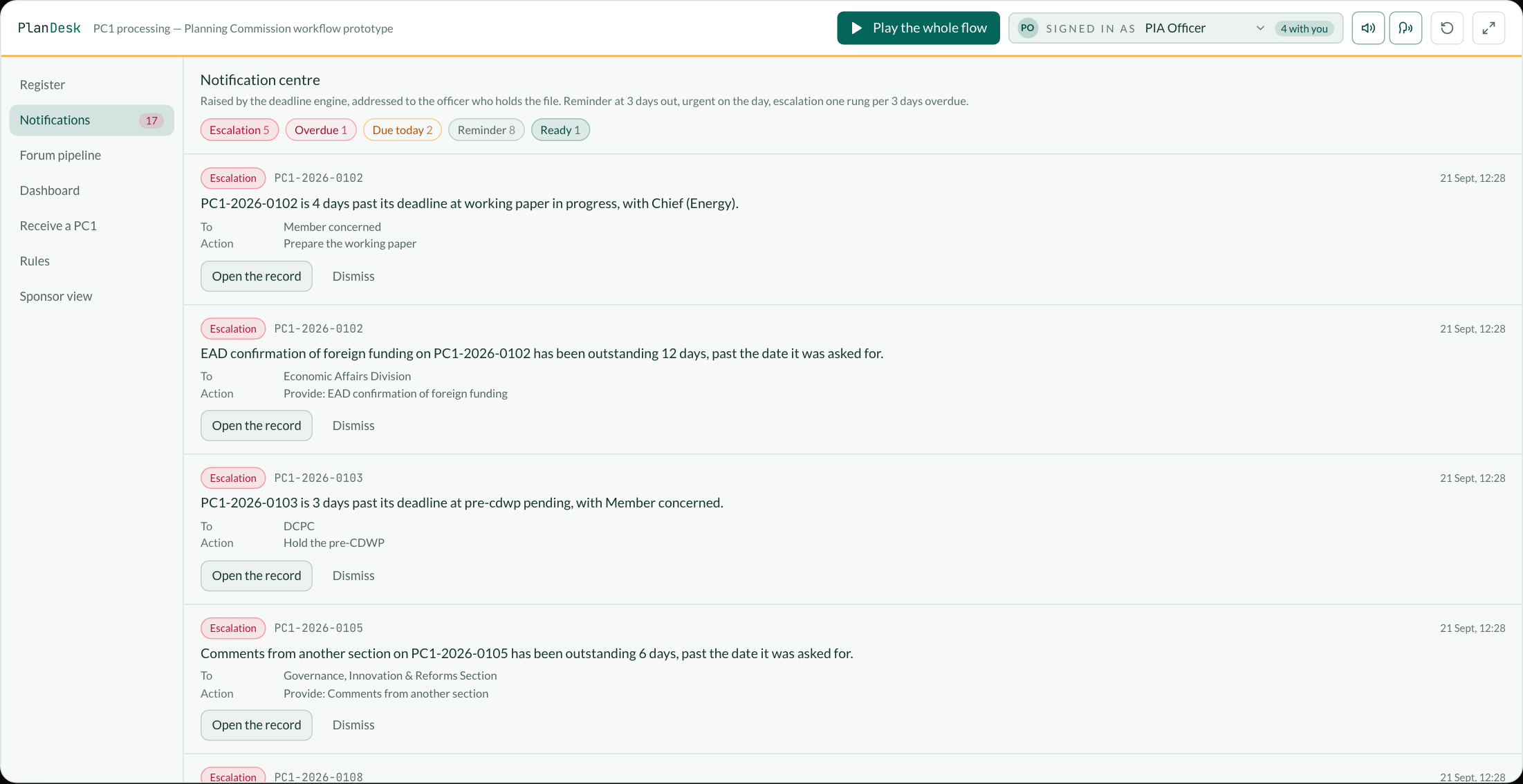
A reminder as the deadline approaches, an urgent notice on the day, an overdue notice past it, and then one rung up the escalation ladder per configured interval: officer, then Chief, then Member. Nothing here waits for somebody to remember to make a call.
The forum pipeline is arithmetic.
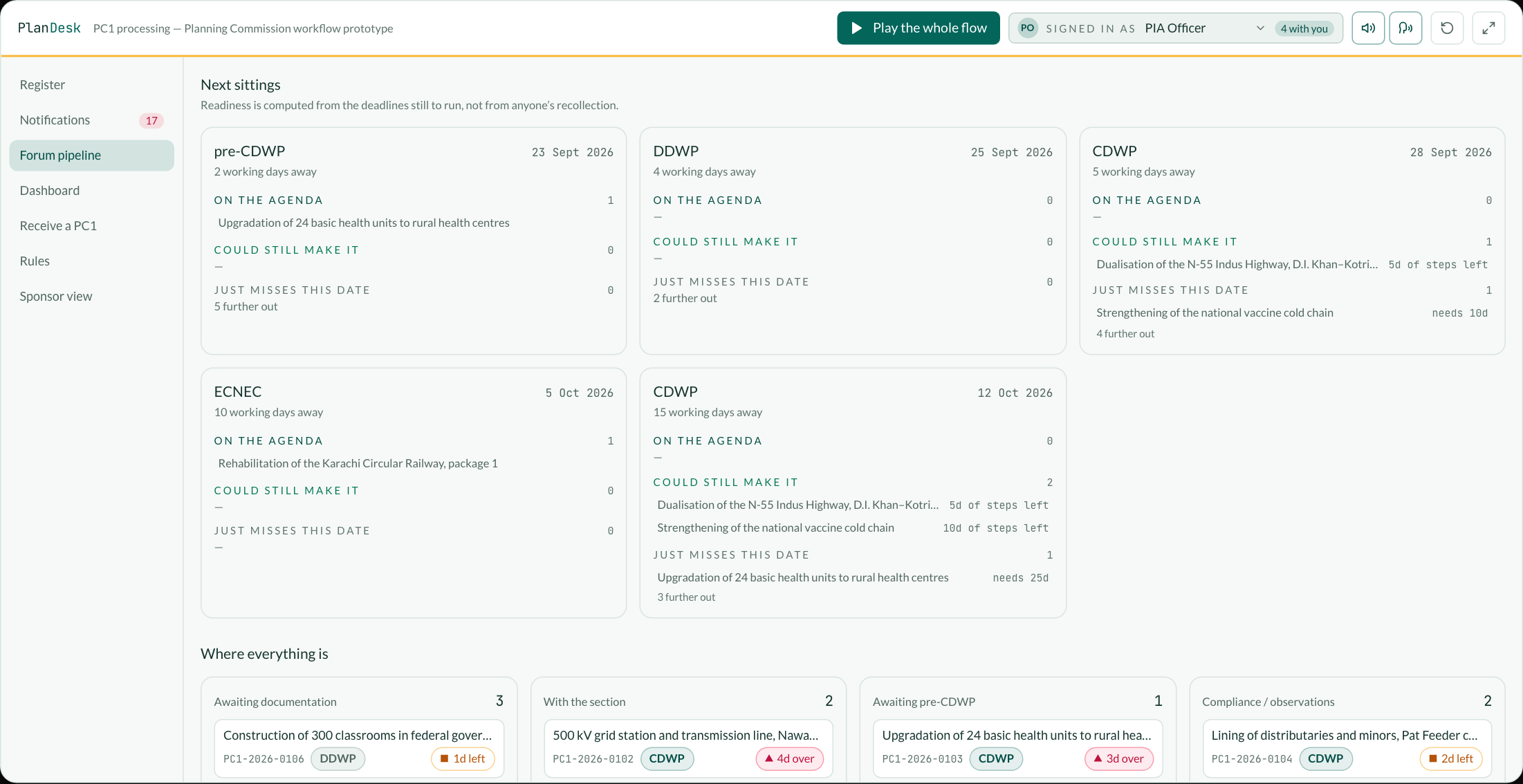
“Are we taking this to the next CDWP?” is answered by adding up the deadlines a file still has to clear and comparing that with the working days left before the sitting. What is ready, what could still make it, and what cannot — before the agenda is circulated, not on the morning it goes out.
Rules are configuration, not code.
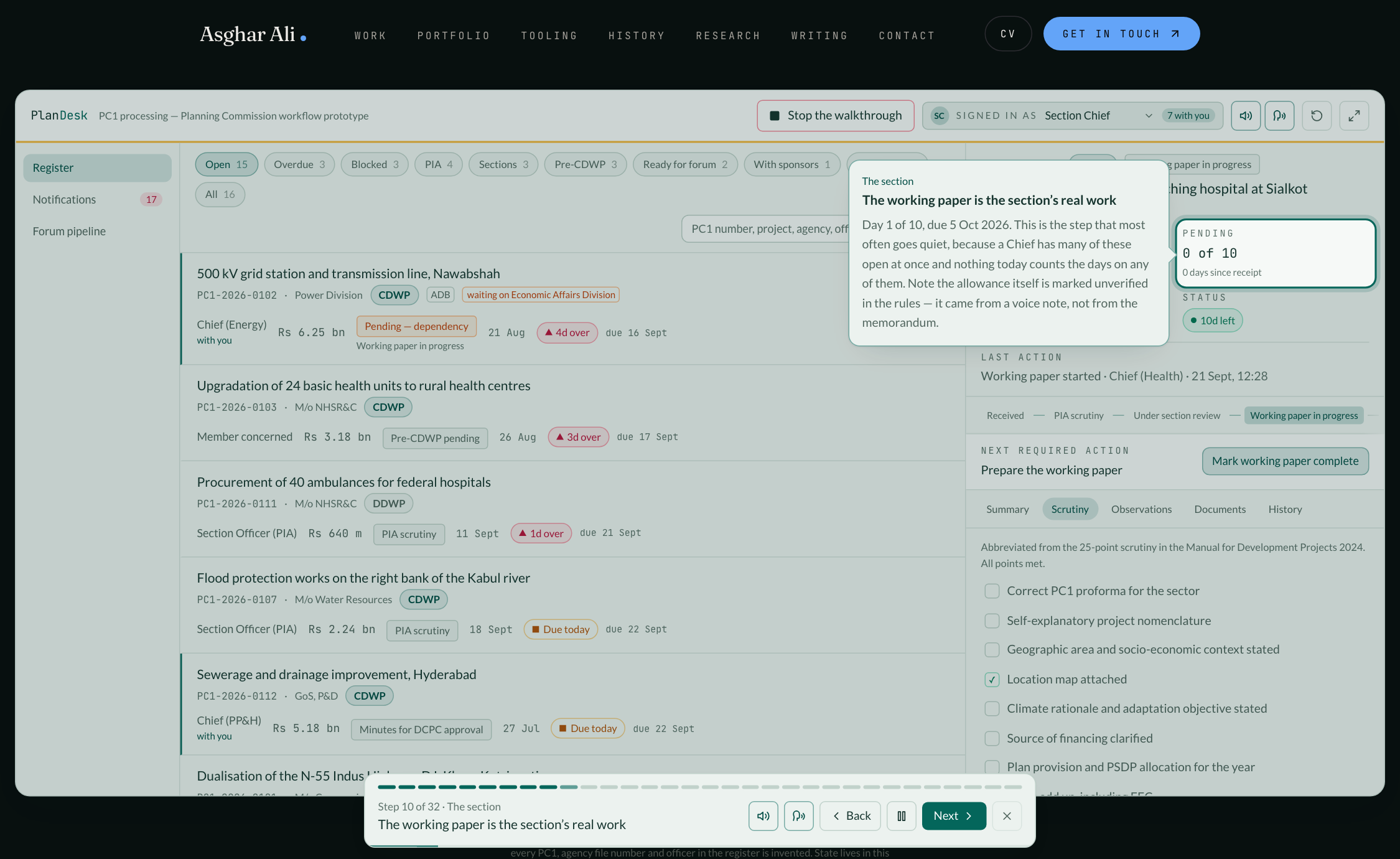
Every deadline, the amber window, the escalation interval, working days versus calendar days, the cost thresholds, the desk that holds each stage, the officer title against each desk and the escalation ladder itself are editable in the app. Change a threshold and every open file re-routes; move a stage to a different desk and every open file sitting in it is re-seated — both are derived from the rules rather than stored on the file. Approval limits and timelines change by notification, and a reorganisation moves work between desks without changing the process; a system that hard-codes any of it is wrong the day after the next one.
The numbers say where they came from.
Eight of the stage deadlines are fixed by the memorandum of 12 August 2025 and two by the Manual for Development Projects 2024. The rest — including the five-to-ten days for a working paper — are assumed from the process as described, and the rules screen marks them Unverified rather than presenting them with the same authority as a notified figure.
The guided run
It explains itself, by doing it.
Thirty-two steps following one PC1 from the form it arrives on to the authorisation and the PC2 after it, with the file changing hands between the PIA Section, a Chief, the Member, the sponsoring agency and management as it goes. Every step performs the real action — a store call, or a genuine press of the button in the app — so what is being described is what is happening. It reads itself aloud unless you turn that off.
Reminders
The notification centre is the phone call, made by the system.
Every line is derived from the state of a file against its deadline, so the list is complete by construction.
The forum
What can actually make the next sitting.
Readiness is computed from the deadlines still to run, not from anyone’s recollection.
Management
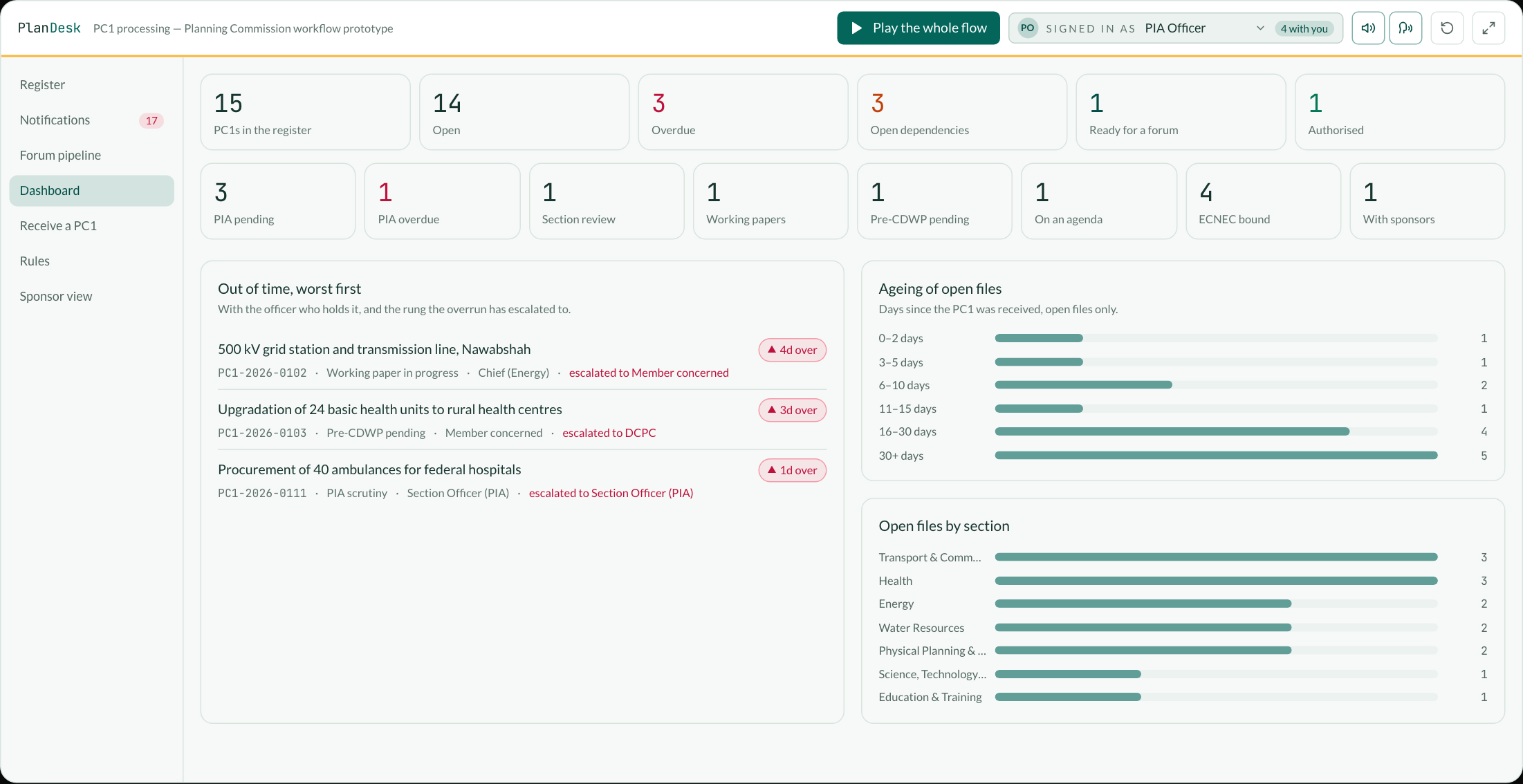
The portfolio, and the files that are actually stuck.
Architecture
How it would be built.
Workflow core
An explicit status machine with one transition function: every move re-derives the desk and the officer, writes an audit line carrying the status it came from, and restarts the clock. Nothing else may set a status, so a file can never be somewhere with nobody holding it.
Deadline engine
Deadlines, warning windows, escalation intervals, thresholds, the desk behind each stage and the escalation ladder all held as configuration and applied at read time against a working-day calendar, with gazetted federal holidays loaded alongside the weekend rule. Scores are computed, never stored, so changing a rule re-scores history consistently instead of leaving two generations of flags in the table.
Notification service
Derived from state on a schedule rather than written by hand, so the list is complete by construction: a file cannot be quietly pending without appearing on it. In-system first, then email or the official internal channel, each notification linking straight to the project record.
Integration with IPS
The Commission already has IPS, and PC1s already arrive there. This is a monitoring and workflow layer over it, not a replacement: read the PC1s and their movements, write back status, and keep one project record per scheme so the documents stay together.
Roles and access
PIA officer, section officer, Chief, Member, management, CDWP secretariat and sponsoring agency, each seeing and editing only what their role allows. The sponsoring agency’s view is read-only: it can see the clock, not change it.
Audit and reporting
An append-only history on every file — time, user, action, previous status, new status, comment — behind the management dashboard: portfolio counts, ageing buckets, overdue files with the rung each has escalated to, and open files by section.
Scope
What this is, and what it is not.
- It is a prototype built from public documents and a described process, not a deployed system and not commissioned work.
- Every PC1, file number, officer and meeting in it is invented. No real project, official or agenda is reproduced.
- It holds no data: state lives in the visitor’s browser and never leaves it.
- The deadlines shipped as defaults are the published ones where a published one exists, and are marked Unverified where the figure is assumed from the process as described rather than notified. Anything the Commission sets differently is a number in a settings screen, not a code change.